- Type
- MIDI Effect
- Author
- Kampfer
- Version
- 1.11
- License
- AttributionNonCommercialNoDerivatives
- Live version
- 9.1.2
- Max version
- 6.1.7
- Downloads
- 6,257
- Updated
- 2018-12-06
TB-3 Remote is a MIDI Effect for Ableton Live by Kampfer, distributed as Creative Commons Attribution-NonCommercial-NoDerivatives. It targets Live 9.1.2 and Max 6.1.7. On maxforlive.com it has 6,257 downloads. First published 2014-07-27, last updated 2018-12-06. 33 user comments below.
New to Max for Live? Read what MIDI Effects do, what the AttributionNonCommercialNoDerivatives license means, how to install a device.
Description
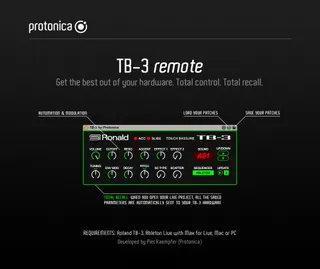
TB-3 Remote 1.1 by Protonica
+ Connect your Roland AIRA TB-3 directly into Ableton Live
+ Edit all sound parameters from the plug-in (even the "hidden" ones like Tune or Modulation/Effect 2)
+ Load and save patches in Ableton
+ Precise automation & modulation of all sound parameters
+ Total recall: When you open your Live Project, all the saved values are automatically sent to your TB-3 hardware
+ If you edit any knob/touch pad from your TB-3 hardware, you can see it moving directly from the plugin
+ Send patches from the plugin to your TB-3 edit buffer and save them to your User bank
+ Perfect for using Ableton's sequencer for more flexibility
+ Auto Update of current values on a Program Change (this is helpful if you just want to change the Waveform/Oscillators of a program, and not the whole sound)
+ Low CPU usage
INSTALL / SETUP
1 Download "TB-3.amxd" to your hard drive
2 Copy "TB-3.amxd" to your Ableton User Library: Ableton/User Library/Presets/MIDI Effects/Max MIDI Effect
3 Now you can find this plug-in in Ableton's Browser ("Max for Live" > "Max MIDI Effect")
4 Drop "TB-3.amxd" on a MIDI track in Ableton Live
5 Drop an "External Instrument" to the right of it. Set the MIDI and Audio routings according to your setup. ("MIDI To" = Ch. 2)
6 Open Ableton Preferences and check the MIDI Page.
- MIDI Port Input activate: "Track" and "Remote".
- MIDI Port Output activate: "Track", "Remote" and "Sync" ("Sync" can be turned off when you use Ableton's MIDI Clips to play the TB-3)
7 Settings on your hardware:
- Connect 2 MIDI cables to the MIDI Input and MIDI Output from the TB-3 to your Audio/MIDI Interface or use USB
- MIDI Channel: 2 (Default)
- MIDI Clock Source (Pad C): On
- MIDI Thru (Pad D): Off
- MIDI Local: On
CURRENT LIMITATIONS (due to Roland's TB-3 Firmware 1.10)
- Scatter works only at TB-3 internal Patterns
- Program Change Messages are not received (but can be sent from the Plug-In)
- Volume and Pitch (XY Pad) works only on transmitted MIDI Notes
VERSION HISTORY
1.11 Parameters are sorted to easy access on Ableton Push, touchAble etc.
REQUIREMENTS
+ Roland AIRA TB-3 (make sure you have the Firmware 1.10 installed)
+ Ableton Live with Max for Live
+ Mac or PC
Developed by Piet Kaempfer (Protonica) in Berlin.
Comments (33)
One minor thinghy, maybe adjust the follow numbers off the parameters so when you see it on Push, reso is next to the cuttof instead on a second bank.
For the rest, really nice!
I just updated it to 1.11. At the moment I don't have Push here but checked on touchAble.
This is how the order looks like:
Page 1:
1. Tuning
2. Cutoff
3. Reso
4. Env Mod
5. Decay
6. Accent
7. Effect 1
8. Effect 2
Page 2:
1. Volume
2. Pitch
3. SC Type
4. Scatter
5. Accents
6. Slide
thank you for this plug in !
Gabriel
Hab das tb 3 über usb angeschlossen..
Die regler im plugin bewegen sich nicht wen ich am tb 3 drehe. Ist das normal? Wen nicht was ist mein problem?
Danke für eure hilfe.
gruss kay
Did the tb 3 connected via usb ..
The controller in the plugin do not move whom I turn on tb 3. Is this normal? Who do not know what my problem is?
Thank you for your help.
greeting kay
Can I use your plugin via the TB-3 DAW only (No MIDI CABLES)? I've tried various MIDI and Externat instruments settings but I cannot affect the TB-3?? Many thanks
When I automate any of the parameters and have it in a gradual increase on the filter for example, the tb-3 starts acting strange. The sound slows down and doesn't get back to normal until a few bars after the automation curve has finished and returned to the value it was before the curve.
If I use the draw tool and have little short changes there aren't any issues.
I've checked with both ableton and Roland, who both suggested I contact you as it sounds like a midi feedback loop is happening.
I sometimes get the same issue when automating 2 parameters at once.
When I automate any of the parameters and have it in a gradual increase on the filter for example, the tb-3 starts acting strange. The sound slows down and doesn't get back to normal until a few bars after the automation curve has finished and returned to the value it was before the curve.
If I use the draw tool and have little short changes there aren't any issues.
I've checked with both ableton and Roland, who both suggested I contact you as it sounds like a midi feedback loop is happening.
I sometimes get the same issue when automating 2 parameters at once.
Yes this might be caused by a feedback loop. To avoid Midi Feedback Loops I added the "sequencer" button. This way it filteres Midi data. If you run a Midi-clip from Ableton to play the TB-3 you have to choose "Ableton" and vice versa.
Piet
I have it set as ableton as the sequencer, only just started to happen as well. Strange!
Kenny
But if you want more :
The TB-3 has much more sounds than is visible on the surface.
"TB-3 EFX.Remote" is a Midi software editor for PC / Mac / iOS.
You can make changes to make the hidden settings and save it in the User Presets U01- U15 .
Info Home: http: //tb3remote.jimdo.com
Greeting, Momo
I have also changed the local midi on/off setting and stopped the sequencer from running in the TB-3 while I trigger Ableton clip.
I've also toggled your Ableton/TB-3 sequencer button in your device.
So far nothing is giving me a clean sounding pattern from the clip.
Any ideas?
I have also changed the local midi on/off setting and stopped the sequencer from running in the TB-3 while I trigger Ableton clip.
I've also toggled your Ableton/TB-3 sequencer button in your device.
So far nothing is giving me a clean sounding pattern from the clip.
Any ideas?
1) please make sure to have TB-3 Firmware 1.10 installed.
2) use Sequencer mode "TB-3" for recording and Sequence mode "Ableton" for playback.
3) Stop the TB-3 sequencer after recording.
Furthermore when you record Midi clips, Ableton will record all knob movements twice. In the recorded clip you can delete the dublicate events.
Can you help please?
Can this device work when the TB-3 is plugged-in an MX-1 ?
Thx.
awesome device! except only one thing: kennycampbell explained it already...
"When I automate/modify any of the recorded parameters ableton and the tb-3 acting strange. The sound slows down and doesn't get back to normal until a few bars after the automation curve has finished and returned to the value it was before the curve."
"If I use the draw tool and have little short changes there aren't any issues."
Further the automation-lines greys out when playing back (even when nothing is done and the reactivation button in ableton is not orange...)
Have you any idea what this could be? thanks for your answer.
Best,
Ivo
(Live Version 9.7.2 - 64-bit for Mac)
I assume it's a MIDI Buffer overload.
This can happen when you have heavy automations going on (e.g. sending over 6 automations simultaneously).
I recommend to check and delete the recorded automations in the MIDI Clips (check Envelopes -> MIDI Controllers) as well. Usually Ableton records doubled: automations in the arrangement and to a single MIDI Clip. That's why your arrangement automations could get greyed out.
Hope it helps
Piet