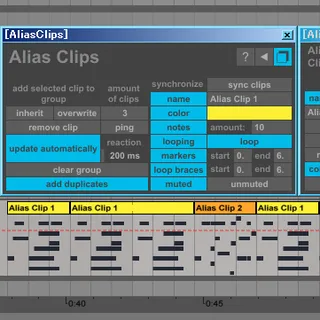
Alias Clips
Alias Clips is a Max for Live device that brings the functio...
- Type
- MIDI Effect
- Author
- JGJP
- Version
- 1.0
- License
- Attribution
- Live version
- 9.1.6
- Max version
- 6.1.9
- Downloads
- 3
- Updated
- 2015-01-11
Alias Clips is a MIDI Effect for Ableton Live by JGJP, distributed as Creative Commons Attribution. It targets Live 9.1.6 and Max 6.1.9. On maxforlive.com it has 3 downloads. Published 2015-01-11. 6 user comments below.
New to Max for Live? Read what MIDI Effects do, what the Attribution license means, how to install a device.
Description
Alias Clips is a Max for Live device that brings the functionality of what are commonly called alias clips, ghost clips, mirroring etc. to Ableton Live. The core concept is that you can duplicate a MIDI clip and have the original and the duplicates be linked, so that when you modify one of them, the duplicates will automatically update themselves with the same modifications. This is not a replacement for native Ableton functionality but it is stable enough to be an adequate workaround. For a video demonstration and detailed illustrated explanations follow the download link.
This is a commercial device priced at $10 USD
Comments (6)
Unfortunately it's not possible to replace audio clips with Max for Live, Ableton allows you to hotswap audio files though across your whole set, try right clicking a waveform in clip view and clicking "manage sample file" and any other clips that use the same original audio file will be updated with whatever new file you choose.
I do wish a single instance could handle inheritance of different clips in the same track. I also wish groove settings could apply, but that's Ableton's limited API behind that.
Otherwise this is a very useful tool for when you need what it offers.
My major peeve is that when I reload a set, the clips are renamed to the same name, that I might have named some other unrelated clip like years ago. So AliasClips doesn’t keep the name of what I entered last. Other than that it seems to work really nice still in v2. It’s great for when writing a track fast and later it can be abandoned. For that point it would be nice to be able to process multiple selected clips.
I'm using it in Live 10.1.5 with the Max For Live 8.1.0.
Please, some support? Some advice for my problem?
If there was a secure way to pay I would have already.