TransposerRT - Receiver
With this device, in conjunction with the TransposerRT sende...
- Type
- MIDI Effect
- Author
- TLC
- Version
- 2.5
- License
- Attribution
- Live version
- 9.7
- Max version
- 7.3.5
- Downloads
- 1,372
- Updated
- 2023-02-19
TransposerRT - Receiver is a MIDI Effect for Ableton Live by TLC, distributed as Creative Commons Attribution. It targets Live 9.7 and Max 7.3.5. On maxforlive.com it has 1,372 downloads. First published 2015-10-20, last updated 2023-02-19. 9 user comments below.
New to Max for Live? Read what MIDI Effects do, what the Attribution license means, how to install a device.
Description
With this device, in conjunction with the TransposerRT sender device (a separate download), you can nondestructively transpose the output pitch of multiple tracks as they're playing. See tutorial video at https://youtu.be/6N5a2qsQgQg
NOTE: IN ORDER FOR THIS DEVICE TO BE OF ANY USE, YOU MUST ALSO DOWNLOAD THE TRANSPOSER_RT SEND DEVICE!!! THE TWO DEVICES WORK AS A PAIR.
TransposerRT makes Ableton Live much more flexible for improvisation, allowing you to broadcast (actually multicast - see "Virtual Channel" below) pitch transpositions to multiple MIDI tracks simultaneously on the fly. For example, you might have a bass track and a string pad track each playing their own clip, while you improvise the melody on another track. It would be nice if while in the middle of playing, you could play pitch transpositions that would be picked up by the bass and the string pad, effectively changing their keys, even as you continue playing the melody with your right hand. This is very easy to do with TransposerRT. Another benefit of TranposerRT is the ease with which you can change your composition once you've created it. If you record the transposition changes into a clip and later wish to modify the changes, you have only to edit that one clip, rather than going back and editing the pad and bass clips. And since the Sender clip only represents pitch offsets, it's ridiculously easy to see what and where the key changes in the song are.
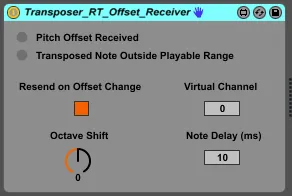
Here are the controls for the Receiver:
Resend on Offset Change -
Use this checkbox to control what happens to an already playing note when an Offset message is received from a TransposerRT sender. If unchecked, currently playing notes will continue playing at their present pitches; if checked (the default), these notes will be turned off and immediately resent with the new transposition.
Virtual Channel -
Modify the value in this number box if you wish to have multiple senders, each associated with receivers listening on the same "virtual channel" and ignoring others. A receiver will only obey transposition commands from a sender on its virtual channel.
Octave Shift -
Use this dial to shift pitches of outgoing notes in octave increments.
Note Delay -
This number box can be used to introduce a slight time delay before processing incoming notes, ensuring that offset changes will take effect before subsequent notes are output. The range is from 0 to 50 milliseconds, with the default being 10 ms.
(Hovering your mouse over a control will cause the control's description to appear in the Ableton Info panel.)
[In addition to minor cosmetic changes, the 2.5 version defaults to 10 ms for Note Delay and the Resend on Offset Change activated.]
I hope you find the two Transposer_RT devices useful. Please leave a comment to let me know what you think of them, or to suggest new features.
Comments (9)
If it's the former, I would say a simple solution would be to not try and switch tracks back and forth so quickly. Not sure why you would want to do that anyway.
Other than that, is everything working?
On feature I would really like is the ability to restart midi clip on new note input (maybe by checking a little box on the receiver device, so per track)
Would it be feasible?!
I'll have to take another look at the M4L API, but off the top of my head I think it might be possible to retrigger the playing clip upon receipt of a note from the sender.
What might even be cooler (and would encompass the requested functionality) would be to select from among a number of clips in the track based upon the note pitch. So, for example, say there were five clips in the track. Sending a note with a pitch equal to the root pitch would cause the first clip to be selected, sending a note one semitone above the root pitch would cause the second clip to be selected, and so on. (Sending a note with a pitch that mapped outside the range of playable clips wouldn't do anything.)
Even if such things are possible -and that's a big if-, the playing of clips would probably still be regulated by Live's triggering quantization setting- in other words, whether the clip started playing right away, or at the beginning of the next measure, etc., would be dictated by the control setting.
Thanks for a great idea; now I must research to find out if it's feasible. Or someone else out there, if they're so inclined; the copyright attribute is "By:", which means anyone is free to take it as the starting point for their own creations, as long as they give me credit for the original version. It might take me some time, as I've turned my attention from M4L programming to other things, so I'll have to get back into it.
you have made great device, but I am also having problem when switching channels, the same problem as @erykszolc.
In fact, even when I am scrolling anything in ableton, there is audio drop.