KEPLER-16- Rhythmic Performance Sequencer
Kepler-16 ‘s visual interface sports a logical design and ...
- Type
- MIDI Effect
- Author
- audioutlaw
- Version
- 1.0
- License
- None
- Live version
- 9.2
- Max version
- 7.0.4
- Downloads
- 3
- Updated
- No Updates
KEPLER-16- Rhythmic Performance Sequencer is a MIDI Effect for Ableton Live by audioutlaw, distributed as freeware, with no license specified by the author. It targets Live 9.2 and Max 7.0.4. On maxforlive.com it has 3 downloads. Published 2015-10-18. 2 user comments below.
New to Max for Live? Read what MIDI Effects do, how device licenses work, how to install a device.
Description
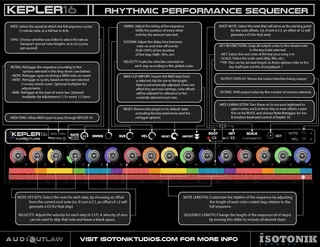
Kepler-16 ‘s visual interface sports a logical design and an intuitive approach to sequencing, featuring custom rhythms, key and scale restrictions, clip import, midi follow and 3 re-trigger modes. Combine that with easy integration with Ableton Push, and you’ve got a hands-on performance tool that feels natural and provides several unique capabilities.
The circles in the center represent the 16 Steps of the sequence, where you can adjust the notes and velocities for each step. The color-coded bars below them show the rhythmic pattern that will be used.
In the top section, you’ll find the rate control, along with other global controls, for velocity and sustain. You can use the swing knob to adjust the rhythm automatically, or you can manually adjust the relative position of the notes in the sequence by clicking and dragging the color bars. The ability to change the note-lengths dynamically opens up a lot of rhythmic possibilities, making live sets more fluid…
Below the color bars you can find the long red length bar. Adjust this to any size to change the length of the sequence.
Kepler also includes a Midi-clip import feature, allowing you to use MIDI from the piano roll in your sequence. You can then change it to a new key, speed or rhythm, on the fly.
Key and scale restrictions are also available, which can automatically transpose your melody to a new chord or key, as you play your controller.
Kepler-16 is available free from IsotonikStuidios.com for a limited time only!
Comments (2)
Also shutting down Live with Kepler on a track causes a crash.