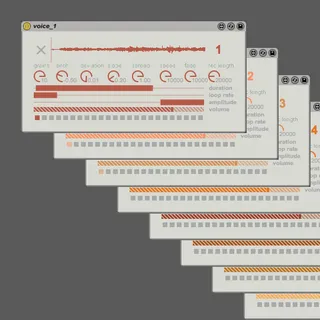
grainfields - granular synthesizer for monome
grainfields turns your 128 grid into a granular synthesizer ...
- Type
- Instrument
- Author
- kasperskov
- Version
- 1.0
- License
- AttributionNonCommercial
- Live version
- 9.7
- Max version
- 7.3.1
- Downloads
- 3
- Updated
- 2016-11-13
grainfields - granular synthesizer for monome is an Instrument for Ableton Live by kasperskov, distributed as Creative Commons Attribution-NonCommercial. It targets Live 9.7 and Max 7.3.1. On maxforlive.com it has 3 downloads. First published 2016-11-12, last updated 2016-11-13. 6 user comments below.
New to Max for Live? Read what Instruments do, what the AttributionNonCommercial license means, how to install a device.
Description
grainfields turns your 128 grid into a granular synthesizer with 8 voices - each with up to 10 constant streaming grains. Modulate grain parameters (pitch, duration, loop rate, position etc.) of each voice to create a large variety of interesting timbres and textures. Record and loop pattern gestures to create rythmic and melodic sequences.
Getting started
Before launching the grainfields Max for Live device make sure that your grid is connected.
1st step in Ableton is to drop 'grainfields_master.amxd' on an empty track. This device establishes the osc connection with monome (and Lemur on iPad). Show/hide osc settings with the toggle at the bottom of the device. Your monome should auto-detect.
2nd step is to drop 'voice_1.amxd', 'voice_2.amxd', 'voice_3.amxd' (...and so on) on separate audio tracks. When a new voice m4l device is loaded on an audio track in Ableton, the device will automatically activate the corresponding lights on your monome grid. If you only need e.g. 3 voices then load 'voice_1', 'voice_2', and 'voice_3'. You don't need to load all voices.
Video demo: https://vimeo.com/190278719
grainfields is also available as a standalone app for monome - more info on: http://kasperskov.dk/projects_MonomeGrainfields.html
Created by Kasper Fangel Skov 2016
Comments (6)
Well I've actually tried to make it as easy as possible to set up in Ableton. It's of course a problem if you can't make the connection work. I've also had some issues with serialosc before - have you experienced this before?
First of all - which version of serialosc do you have installed on your computer?
What kind kind of monome do you have? These devices are only tested with a 128 varibright grid.
Alternatively, you could test the standalone version, and see if this works - download: https://github.com/kasperskov/monome_grainfields-v1.0
Best,
Kasper