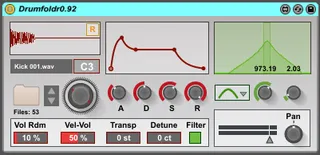
Drumfoldr
Drumfoldr was designed to overcome the limitation of the Abl...
- Type
- Instrument
- Author
- ldmdevices
- Version
- 1.3
- License
- AttributionNonCommercialShareAlike
- Live version
- 9.7
- Max version
- 7.2.4
- Downloads
- 4
- Updated
- 2019-10-04
Drumfoldr is an Instrument for Ableton Live by ldmdevices, distributed as Creative Commons Attribution-NonCommercial-ShareAlike. It targets Live 9.7 and Max 7.2.4. On maxforlive.com it has 4 downloads. First published 2017-01-06, last updated 2019-10-04. 24 user comments below.
New to Max for Live? Read what Instruments do, what the AttributionNonCommercialShareAlike license means, how to install a device.
Description
Drumfoldr was designed to overcome the limitation of the Ableton Sampler to have only 128 samples within the chain selector, and to enable automatic updating of the contents of a folder.
Put the device into a cell of a Drumrack, select your drum folder, and now you can select any hit from within that folder*.
Finding the ‘right kick’ can now be done much more easily, without any need to pre-fill a Sampler with specific files. Change the contents of your folder any time and the device will reflect those changes and still save the right sample into your Live Set.
Included within the device are the basic functions you would find within Simpler – ADSR, Transpose, Detune, Filter – LP, HP, BP, BS, Panning and Gain.
Of course, MIDI is limited to 128, so if you map the dial to a controller you wont be able to choose through every single sample, but you can also use the Up & Down controls and the menu for more detailed control.
*limited arbitrarily to 5000 files in the folder
v1.2 - fixed issues with the default adsr~ object which was creating clicks and audio issues. Vel-Vol updated.
v1.3 - GUI fixed for Live 10
Comments (24)
I'd love to try this device out, it sounds really useful! Could you maybe check the freezing thing and re-upload it please?
The only issue so far is transpose doing nothing to the sounds.
I will check for other things as well but,... bravo!
JR
If so, will 100% purchase this. :D
I'm working on getting exactly that to work, so that I can have an automatically updating dynamic folder of every audio file with "kick" in the name of it, that is under say 2 seconds in length. For me anyway that will do the trick nicely, if I can just find a way to make a truly dynamic folder. I'm hoping I don't have to resort to Automator or somesuch, but it may be the only way.
Oh and I second the request to raise the limit for just such an application as this.
Additionally to the developer, the plugin works for me but the menu which allows for selection of filter type (at least I think that's what it is) is empty and does nothing. Everything else appears to work.
Would love to have a reset function though like doubleclick a knob or CMD/Alt click, etc. Something to just set the param back to zero.
Great plugin tho, much needed so thanks!!
The clip plays a solid, full-bodied drum sample. The sampler (drumfoldr) plays back a weak, thinner, and truncated sound. Not the same at all. I've got the envelope on df cranked open all the way, no filter, and velocity at 127. drumfolder sounds pretty awful by comparison actually... I'm pretty shocked and disappointed. Anyone else noticing this??
I love the functionality of this plugin but if it's drastically altering the sample content, then sadly it's not very usable. =(
I too have noticed the difference in the sample playback sound you are talking about. Any idea how / why this is happening?
So, since the symlinks workaround is an option, think it would be possible to lift the 5000 file limit to say something like 50000? I don't think I have that many kicks, of course, but I know there are more than 5000. :D
But I have a few problems with the device.
1. There is a strange clicking sound.Especially with kick sounds. It is getting better, if I pull down the release knob to minimum. You have any idea how to fix that?
2. I can't see any filter options, so I can't switch the filter types
Thanks for your help!
P.S. Ableton should integrate the folder decice to simpler :)
I'm sorry to hear there are issues. Are you getting a click with many different samples? I haven't heard of any issues like this. It's been a while since I looked at this device.
As for the filter, does the device look the same as the picture here? If it is then you click the filter button at the bottom for the options to become active. If there is any image not showing it means i'm an idiot and i forgot to freeze the device for the latest update!
I tried a bunch of samples. Snares and hi hats are ok.
But most of the kick sounds have got this clicking.
I can send you a link with some examples.
No, the filter section doesn't look like the picture here.
I already clicked on the filter button, but nothing happend. It's still gray.
Thanks for your time!