- Type
- MIDI Effect
- Author
- Vayner
- Version
- 1.53
- License
- AttributionNonCommercialShareAlike
- Live version
- 9.6.2
- Max version
- 7.2.4
- Downloads
- 5,548
- Updated
- No Updates
Honey-Mapper is a MIDI Effect for Ableton Live by Vayner, distributed as Creative Commons Attribution-NonCommercial-ShareAlike. It targets Live 9.6.2 and Max 7.2.4. On maxforlive.com it has 5,548 downloads. Published 2017-02-09. 23 user comments below.
New to Max for Live? Read what MIDI Effects do, what the AttributionNonCommercialShareAlike license means, how to install a device.
Description
Honey Mapper is the successor of my old Sixteen Macros mapping device.
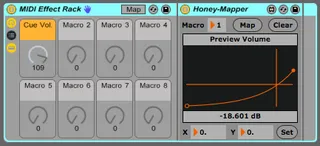
You place a Honey Mapper inside a Rack and control it with one of the 8 Macros that the Rack provides.
A parameter can be mapped by clicking on it first and then on the Map button of a Honey Mapper.
Multiple parameters anywhere in the Live Set can be controlled with a single Macro.
You can give a custom name to any of the Macros, which will be displayed on Control Surfaces like Push.
Features:
- Map one Macro to as many parameters as you like.
- An envelope with curves that allows you to remap the 0-127 range of the Macro against the range of any parameter. You can even skip values, useful if you want to skip a few filtertypes for example.
- The Envelope can be set by either clicking on it or by setting specific X and Y values. (X is the Macro value, Y is the target value)
- No parameter values are stored, so there are no issues with a set reloading with the wrong values.
- Works with all Control Surfaces that can control Rack Devices. If it has a display, it will show the (custom) name of the Macro and a value range from 0 to 127.
- Also works with MIDI Learn to the Macro Controls.
- It will also work combined with “Normal” Macro mappings. In that case you can get it to display a different value instead of the default 0-127. For example, if you map it to a filter parameter inside the Rack, it will display the filter values. While also able to control many other parameters. You basically decide which visual feedback you get.
- Works with the MIDI Takeover Modes that are native to Live
- Toggle the locked parameters on/off with the Rack on/off buttons.
- Settings can be saved with your Live Set.
- Settings can be saved as a Rack Preset if everything that is mapped is also in the Rack.
- Settings can be saved as a Live Clip if all the mappings are on the same Track. (You can load mappings across tracks by importing .als Live Set files though)
Known Issues:
- A parameter can only be mapped once. Duplicating a mapped device or trying to map a parameter twice will give an error in the Max window.
- You can map to the same Macro that is controlling a Mapped device. So if a Macro is the last parameter you clicked on before you press the Map button, you basically got a feedback loop.
On the plus side of that, you can control one Macro that has say 16 mappings with their own curve, from another Honey Mapper with its specific curve. You can go as deep as you want as long as Live can handle it.
Envelope Controls:
- Click to make a Breakpoint.
- Shift + Click to delete a Breakpoint
- Hold ALT and drag the line between 2 Breakpoints to alter a Curve.
- Use the X and Y boxes to set the values with more precision. Use the Command modifier for fine control of the Y value.
Comments (23)
There is no limit really. But you need to work in "banks" of 8. Each Rack can be considered a Bank and you can have as many of those as you like.
The main advantage of using the Macros from Rack devices is that it updates your controllers without fail. When a device is selected, it sends out its current values.
So the equivalent of the preset system on Sixteen Macros is just selecting a different Rack (Bank).
But when I try to map the second parameter with the map button on the honey mapper, it forgets the previous mapping?
You need to add a Honey Mapper for each parameter you want to map. If you want to control 8 things with 1 Macro, you need 8 Honey Mappers set to Macro 1.
Does this device work with plugins also or is it just Live's parameters? It works well for me with Live's parameters but it doesn't seem to acknowledge any plugin ones.
Thanks, P.
You need to select the parameters on the device itself. Up to 128 plugin parameters can be mapped that way. It won't work if you select it on the plugin GUI.
If no parameters are exposed in the device view, click on the Configure button on the top-right of the device view. Then any parameters that you change from the GUI will also be visible. You can even drag them around and change the automapping order.
I hope this helps.
Cheers,
Bjorn
It seems that while automating a macro knob plays back fine in real time, freezing or exporting the track completely ignores macros containing Honey-Mapper.
Anyone else having success with automation?
I must admit it took me a little while to understand (the vid for 16 macros helped a bit) Now I can change the instrument/s playing in a rack and know that my hardware controllers will pick up the right parameters in the instrument that's sounding. AND the ability to map other Ableton knobs (fx sends etc) is just fantastic.
Wishlist? I turn instruments on and off in my racks (to vastly cut down processing) by using hardware midi buttons...if that same remote midi action could isolate the functioning of the macros to the active instrument only, then all the other instrument's settings would remain pristine and ready to go when their time comes! Something like the clip mapper presets, that identify with the honey mappers of just the one instrument (or scenario) that you want them to.
HAHA. more more more! But this is brilliant anyway. Thanks again.
BTW i was looking at 16 macros in reference to the functionality desired above - but I couldn't stop ableton thinking it was an audio device,,,
Silly me.
Yippee!
16 Macros switches to the right preset for that particular instrument, as is it's wont but being control by midi instead of clips. In other words each button has a dual function, sending cc channel info to the instrument switches (like normal - except the cc ranges are only 3 numbers long eg cc34, values 3-5) At the same time, midipipe is duplicating the signals and converting them all to the same cc channel. Because each one has different values (is it rpn numbers?) 16 Macros treats the data as a continuous controller and 'scrolls' through its range (which is set to 8 in ableton's midi assignments popup) so that each button takes the presets on one number. I think I chose unneccessarily complicated numbers... In the nano editor, the rpn? values for each different cc-chanelled button were (off/on):3,5/15.17/31.33/47,49/63.65/91,93/110,112. /125,127. These work for 16 Macros to put up the number by one (if as I said the range in midi assignment window is set to 8 instead of 64 and they are merged onto the on cc channel by midipipe) - but you also have to set each normal trigger assignment in ableton's assignment menu separately too, because of the small rpn ranges. The numbers I used - instead of 64-127 - were 4,5/16,17/32,33/ etc one less than those above so the switch could turn off.
Anyway, what fun. And all credit goes to the creators of 16 Macros - and it's fine offspring. Btw - there might be much more simple ways to achieve this - if you know of one, leave a note below?
Is there a manual or tutorial on how to use this device? I don't quite understand how this works.
It solves my problems with map 8 because:
Map8 has limitations because you cannot user-define the macro name. the name also does not appear on push. Additionally, it would be nice to have the macros in the midi slot instead of audio slot on midi channels.
this device can solve all these issues (i hope, i can;t test it until it works in L11!)
- Activated "Map" in my Live rack and selected the Macro >, deactivated Map and renamed the Macro in the rack
-Pressed Map on the HoneyMapper and selected the parameter to control
Then I drew the curve I wanted and controlled my parameter from My Push that displayed the name I had given it.
The only question is where to place all the HoneyMappers.