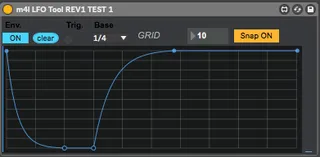
Side Chain Tool
This is the one features I wanted from LFO tool. It was easy...
- Type
- MIDI Effect
- Author
- techbuzz
- Version
- 1.0
- License
- None
- Live version
- 10.0.1
- Max version
- 8.0
- Downloads
- 3,402
- Updated
- 2019-02-10
Side Chain Tool is a MIDI Effect for Ableton Live by techbuzz, distributed as freeware, with no license specified by the author. It targets Live 10.0.1 and Max 8.0. On maxforlive.com it has 3,402 downloads. First published 2017-02-11, last updated 2019-02-10. 6 user comments below.
New to Max for Live? Read what MIDI Effects do, how device licenses work, how to install a device.
Description
This is the one features I wanted from LFO tool. It was easy to build and I wanted to share this device in case anyone else wanted it. There is a youtube video showing how to use the tool. Enjoy!
UPDATE 2/10/2019 Fixed the device not saving the curve when saving the live set or saving the device a preset curve. Now there is just the option for grid lines. If set to 10 for example, then there is 10 in the X and 10 in the Y direction
Comments (6)
Any idea on how the multiple instances of this vs. LFOTool match up?
Thanks for the comment. I have not tried multiple instances of this tool. I did match this tool vs LFO tool side by side to see if the resulting output was the same and it was very close. That is all the testing I did.