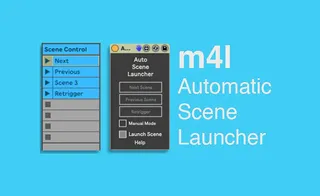
Auto Scene Launcher
ASL is a max for live device that is using clip names and/or...
- Type
- MIDI Effect
- Author
- Panosla
- Version
- 1.3
- License
- Commercial
- Live version
- 10.0.6
- Max version
- 8.0.2
- Downloads
- 0
- Updated
- 2019-04-15
Auto Scene Launcher is a MIDI Effect for Ableton Live by Panosla, distributed as a commercial (paid) device. It targets Live 10.0.6 and Max 8.0.2. First published 2019-02-28, last updated 2019-04-15. 10 user comments below.
New to Max for Live? Read what MIDI Effects do, what the Commercial license means, how to install a device.
Description
ASL is a max for live device that is using clip names and/or automation to automatically launch scenes in Ableton Live. The device is using the clip name to set the function of the device, such as next/previous/go to scene, and a midi note is used to fire the according scene.
Minimum Requirements:
Ableton Live 10.0.4
Max 8.0.2
For more information take a look at this demo:
https://youtu.be/EeyfZt1T0PI
----
New Update
ASL V1.3
Change log:
New engine for reading the clip names.
Introduction of separate manual and auto mode (Manual can be used either with automation or midi mappings, auto is utilising the clip name).
Bug Fixes:
Fixed a bug that would prevent the device from working properly when the track that contains the device is moved, other tracks are created before the device or expanding/minimising group tracks.
Comments (10)
I bought the device, thinking that the "next" button will continuously play the next scene, so I can assign it to a sample pad and you need only one pad for launching the next scene. But it seems that you need one "next" button / midi clip per scene? Is that correct? If so what`s the advantage of the device anyway? because it seems you need as many "next" clips as scenes. thanks for an answer
http://maxforlive.com/library/device/2768/midi-note-to-clip-slot-trigger
My settings.
Mac OS [ Live10 Preferences ->Launch -> Select Next Scene on Launch ->ON ]
This makes the scene selection strange.
Is there a solution?