Add two buttons
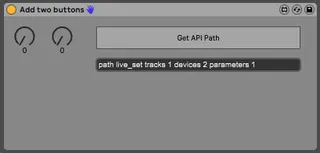
This device computes an average of two midi values and sends...
- Type
- MIDI Effect
- Author
- icoste
- Version
- 0.0.1
- License
- Attribution
- Live version
- 10.0.6
- Max version
- 8.0.2
- Downloads
- 185
- Updated
- No Updates
Add two buttons is a MIDI Effect for Ableton Live by icoste, distributed as Creative Commons Attribution. It targets Live 10.0.6 and Max 8.0.2. On maxforlive.com it has 185 downloads. Published 2019-03-11. 4 user comments below.
New to Max for Live? Read what MIDI Effects do, what the Attribution license means, how to install a device.
Description
This device computes an average of two midi values and sends the result to a designated control wherever in Live using the Live API.
During one of my live sessions, I wanted to be able to add some variety to automation curves on the fly using my midi controller... Since it wasn't possible with Live only (as far as I know), I made this very simple midi effect that gets the average between two midi values, which can be controlled either with a midi controller or with an automation curve.
Basically, it helped me adding some variety to one of my set using a midi controller while keeping the precision of the automation that creates effects.
Attribution: In order to make it easy for someone to control a midi value in Live with this code, I used the code from synnack's getLivePath device (Please check his device over here: http://www.maxforlive.com/library/device/1293/getlivepath).
How to use:
1 - Link both dials to any midi controls that uses values 0-127 (like, a midi knob on a midi controller or an automation curve)
2 - Click the "Get API Path" and click on the control you'd like to handle with this device (so far, elements that don't use midi values can't be used as targets, i.e volume, panning and sends don't work)
IMPORTANT: Every time Live starts, you'll need to initialize the API Paths using the "Get API Path" button!
Maybe I'll update the device as such:
1 - Give the device some memory for the Live Path between sessions.
2 - Add a line control in order make a weighted average (30% of left dial, 70% of right dial for instance)
3 - ... Nothing incredible because so far I'm discovering Max4Live programming and it's my very first device :) Any help is welcome!
Comments (4)
see here i am add your need
http://www.maxforlive.com/library/device.php?id=5319
you can see how made live recall parameter with object Pattr
and scale object 0 127 0. 1. for volume pan ect..
download M4L Building Tools
and see Max patch in folder = API
and in folder =Lesson Devices = API Navigation Tools
you find all you need to start with max
https://www.ableton.com/en/packs/max-live-building-tools/#?item_type=max_for_live
have made this exemple patch
http://www.maxforlive.com/library/device/4286/mikado-base-save-patch-preset-with-live-projet
and here another for how to use
two pattstorage object in same patch with Preset object
((normaly only one pattstorage per patch can work ))
http://www.maxforlive.com/library/device/4291/mikado-two-pattstorage-and-preset-seq
I'll give it a look as soon as I can!
Thanks a ton for giving me so much help :)