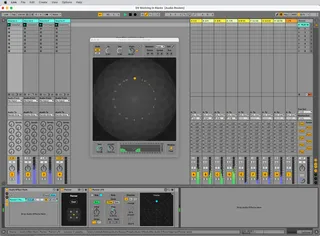
Audio Routes
A set of Max for Live devices and example sets that greatly ...
- Type
- Audio Effect
- Author
- cycling74
- Version
- 1.5.1
- License
- None
- Live version
- 11
- Max version
- 8.5
- Downloads
- 1
- Updated
- 2024-09-04
Audio Routes is an Audio Effect for Ableton Live by cycling74, distributed as freeware, with no license specified by the author. It targets Live 11 and Max 8.5. On maxforlive.com it has 1 downloads. First published 2019-11-12, last updated 2024-09-04. 79 user comments below.
New to Max for Live? Read what Audio Effects do, how device licenses work, how to install a device.
Description
A set of Max for Live devices and example sets that greatly enhance the audio routing capability of Ableton Live.
Created by Manuel Poletti and Cycling '74, this system allows users to create new effects routings, side-chain effects, and even support surround systems with up to 32 channels. Using the new routing functions in Live and Max for Live, users can create additional aux busses (beyond Live's 12 sends), complex switching matrices, or step-sequenced multi-channel panning, and now fully functional inside Live Racks.
New in Audio Routes v1.5
• Audio Routes devices now work inside Live Racks
• Racks allow parallel routing chains and spatialization
• Snapshot a complex chain into Live presets (although, in the case of multichannel routing, routings won't necessarily be retained in the context of another Live set with different outputs)
• Audio Routes device automation transfers to other tracks when copying/pasting
• Copy/Paste/Share routings where added to Rand Panner and Step Panner
For technical support, email [email protected]. Learn more about Audio Routes v1.5:
https://youtu.be/tHBD50BWE0k
https://cycling74.com/articles/audio-routings-a-new-system-for-multi-channel-routing-in-ableton-live
Comments (79)
very useful
@brodiem, if I'm understanding you correctly, you can use the Audio Sender and Audio Receiver devices to send your signal on one track to any number of destinations, from anywhere in the track's signal chain. please email [email protected] if you have any further questions!
Recalling a Rack containing the devices seems okay.
OS X 10.13.6
Live 10.1.3
The .als files load fine if you do not have Ableton running and you just load them by double clicking them to invoke Ableton Live to start up.
The .amxd's will load just fine on their own within an existing set.
Pointing this out in case anyone else ran into this issue!
These devices are great ! Thank you very much for posting...
It will be priceless regarding to live performing for theater and dance shows...
Anyway, I wanted to know if inside the "audio matrix" it would be possible to make routing changes on the fly automatable and then recordable.
Actually for live purposes it's great to change the routing content of a preset on the fly but theses changes are not midi recorded in the arrangement view (at least it's possible to record receiving tracks in audio but then the timings and routing actions are fixed...)
Or maybe there's a trick to somehow do the same with another technique ?
This is a great plugin anyway, I'l make good use of it !!
Cheers.
just sending from a group to an audio track. I use the device as sends, it works perfect to solo the return signals and treat them independantly.
For example, let's say I want input 1 on chain 1, input 2 on chain 2, input 3 on chain 3.
When I flip between the different chains, all of the inputs remain active.
If I work with two inputs, without using Audio Routes 1.0.4
I typically work with just two inputs, and use a Utility on each channel panned hard left and right, followed by another Utility to make it back into mono again. It's a bit of a hack, but it works great, I just need 3 inputs instead of 2.
it would be awesome if I could get this to work.
Any suggestions, would be great!
Thank you
https://drive.google.com/file/d/1qcGLejm3_9Z9Meqq8Zms392wlM0jStbE/view?usp=sharing
However, the Senders do not load properly when re-opening the project.
There is no signal when sending...
you have to remove the devices from the rack to get them to work, then reinsert it them the rack and re-map everything.
Doing this for 40 tracks every time I open a Live set is totally impractical.
PLEAS PLEASE PLEASE fix this issue, it would truly revolutionise my live set performance.
But as it is ... unfortunately unusable.
If I don't use instrument fx rack, I the serial nature of the audio transmission means you can't have thru in paralel and affect the different senders.
The Audio Senders different gains do not appear properly on Push either, si its impossible to automate them on the fly without a rack.
I IMPLORE you, please update with a fix!
Thanks!!!
:`(
It works when reloading project and pasting from one track to the other.
It is PERFECT :)
This makes me think its a bug in the Cycling 74 version.
As a side note to others on this thread, these devices were not designed to work within racks. Please reference the device creator's comment in our original article: https://cycling74.com/articles/audio-routings-a-new-system-for-multi-channel-routing-in-ableton-live
"Thanks for the report. Well, not really a bug, rather a missing feature - the devices were not initially designed to work within racks. The "bug" has to do with the way the devices interact with the Live mixer device, which differs whether the device is loaded inside a track or inside a rack. This feature should be added in a future version, though."
For a small number of tracks/devices no problem... but if you have a lot of tracks (just try with 64 tracks on which is loaded "Audio Routing Example") on reloading the song on max for live console you get the error "live.observer: Can't obtain live set at this time" (and a huge number of warning also). any idea? is someone having this issues. I'm in more than one computer and same problem on MACs and PCs
When I do this however, Audio Sender doesn't work. It has to be loaded in individually, then placed in a group to work. Very annoying as I nearly always use it in this context.
Is there a fix for this in the pipeline?
Tom
"Thanks for the report. Well, not really a bug, rather a missing feature - the devices were not initially designed to work within racks. The "bug" has to do with the way the devices interact with the Live mixer device, which differs whether the device is loaded inside a track or inside a rack. This feature should be added in a future version, though."
While the Live sets included here won't open in Live 10, as long as you are using Max 8.5.4 (available at cycling74.com/downloads), you should be able to use the .amxd files (Max for Live devices) included in this set in Live 10.
Download the .zip file linked here and navigate into Audio Routes/Presets/Audio Effects/Max Audio Effect/Imported, and drag one of the .amxd files onto a track in Live, or otherwise load the devices however you'd like.
I want the umenu to only display some tracks (some output routings) and not displaying the "Ext. Out" or the track the device is in, for example.
If I know the track ID associated with every output_routing, I could delete the one associated with its track from the umenu.
Thanks!
Yes, I did look the BrowseRouting and RoutingObjects and the LOM.
I know I can get any track/device input/output available/current routings, but I can't find a way to get the track associated with that routing.
When I get the routing information I get a dictionary with a display_name (the name of the track routed to) and an identifier (not the track id).
The display_name is not useful as it can be 2 tracks with the same name.
What I want to do is: if I have 2 tracks and the m4l device on the track 1, I want to populate a umenu with only the output routing to the track 2 (and not "track 1", "track 2", "No input", "Ext. Out").
I will appreciate if you could point me in the right direction.
Thanks! (and sorry for my english)
In the meantime, to get the information you are imagining, you'd have to conceive of some different logic to place in these routing abstractions. This conversation is getting outside of the scope of these devices' comment section, though, I might recommend you check out the cycling74.com forums, or the #max-for-live channel on the Max Discord. I'm sure the folks there would be down to explore this quest with you! If you don't have the link, the Discord is here: https://discord.gg/WSMSf9N4wh
If you have a more specific question or request, please feel free to email [email protected], and we'll be very grateful to hear about it.
I have a question using Rand Panner :
I have many clips on one track, playing randomly one at a time with the follow action feature; Every time a clip is triggered, I would like it to to get out of one speaker at a time randomly.
I thought that when one clip is launched it should hit the pulse button but I have no clue on how to do that. (pulse function is not available for mapping)
Someone have an idea ?
Thank you a lot for the amazing work
Manisha
hi @ancestralvision -- thank you, I'm sharing this feature request with the device creators!
- Alex from Cycling '74
My name is Max DetaL’ and I’m absolutely stoked about your sender! But I’ve run into a little snag and have a couple of questions for you. Really hoping you can help me out.
1 – Is there any way to set it up so I can tell the sender to route its signal, say, to the first send channel named “A Drum Looper,” and then save that configuration so that every time I open a new sender, it automatically sends the signal to the channel I set before saving? In other words, can I lock it permanently to that send/return channel “A Drum Looper” (which I have in literally every project and always as the first one)? Right now, the device doesn’t save the routing on a new launch, which is super disappointing since it means I can’t use it.
2 – Maybe it’s possible to create a sender that specifies a virtual bus. For example, in the sender we could assign something like A1, and if the receiver is also set to A1, then they’d always be locked to work together. All A1 senders in the project would automatically send everything to the receiver where A1 is selected. Is this even possible? It’s important that I can save a preset and have it load immediately with the bus I configured in advance.
Really hoping something can be done. Your device is super cool. Thanks!
- Ashley from Cycling '74
But if I knew how to make M4L plugins, I’d do it like this: we’d create two devices—a sender and a receiver. Each of them would have a certain number of channels, say 20: A, B, C, D, and so on. So, when I select, say, “B” on the sender and the same “B” on the receiver, the devices automatically link up and the sound comes out of the receiver. In other words, the user would choose not a channel, but simply the name or number of the “virtual” audio channel. The sender would have a passthru button for the audio.
Also, I’d try to do it without using the Ableton API, if that’s even possible. That way, the system won’t be overloaded when using a very large number of senders.
sooo =)
I thought you might be interested in adding such a device to your collection.
@chapelierfou We don’t use live.routing because it is not possible to route multichannel audio using that object - only one port can be targeted in a single M4L device.
thanks for the answer ! Really useful as I was facing this issue. It's quite a step backwards isn't it ?
I will do my best to describe the issue I am having, but I apologise up-front if my description is unclear.
I am currently working on a 10-channel installation that is in rectangular formation. When working with stereo sources, I was wondering if there is a way to stop the channels from converging into a mono based on the cursor's proximity to the centre of the pan-space (ie. at Az 0.00º / Dist 0.00). In essence, I would like to be able to move the sound with the width of the Left and Right to remain consistent, regardless of where the cursor is in the pan-space.
As an example, where channels 1&2, and 9&10 are at the corners at each end of the rectangle, imagine starting with the cursor at Az -180.0º / Dist -1, and then moving it vertically along the centre axis to Az 0.0º / Dist +1, but at this movement took place the L/R channels remained at a set width during this movement. In essence, moving a stereo piece of material along the length of the rectangle, and not have it converge into mono at the centre.
I know it's a pretty niche request, but I wonder if there is some way to disable this convergence for stereo material in the panner? If not, perhaps someone else knows of another m4l tool that can do this with the convenience and fluidity of a cursor based panner. I realise this kind of thing could be approximated by splitting the stereo source into two mono tracks with a panner each, or with something like Audio Sends and a lot of punishing automation, but either of these would make the process simply too painstaking and sluggish for this project. Moving and automating a single cursor across a pan-space is what is needed.
Anyhow, a weird one, I know! Any help is much appreciated!
I am not the best with live programming, but I have been trying to copy/paste and edit in 8 extra channels (in the panner window) to achieve a 40 speaker panning system. However, it seems that maybe M4L is not supplying more than 16 target track ids (to make the current max of 32 channels; stereo)? This sounds like a wrong assumption and maybe I just have not set up the new channels correctly to receive an additional 4 target track ids :P
Would anyone have an answer why copy/pasting and naming-in new channels would not work off of the bat?
Thanks in advance!
My setup:
I use Audio Send on basically every track/group as extra FX sends on top of Live’s default A/B returns. All of them get routed through Audio Effect Racks to keep the project tidy. This way, I'm not adding a bunch of return tracks.
The issue:
The device straight up doesn’t remember its routing.
If I save it as a preset or inside a rack, every routing assignment is gone when I reload it. I’ve gotta manually re-route everything every time, which is… painfully slow.
Current workaround (and it sucks):
The only way around it is to make template channels with everything already wired, then duplicate those tracks. But that means I can’t just drag in a fresh track with my preset or save an audio or midi track as a default with the pre-set routings.
I got to copy/paste sends, which slows down big projects massively.
What I actually need:
I need the Audio Send device to store and recall routing destinations when saved as a preset or when inside a rack.
Ideally, someone could tweak the device so it remembers:
The routing parameters using pattrstorage or whatever make sense and restore everything automatically on load.
When will this update come out? I am eager to have this feature. My set up depends on it.
When will this update come out? I am eager to have this feature. My set up depends on it.
- Alex from Cycling '74 support