- Type
- Audio Effect
- Author
- Empytree
- Version
- 1.2.4
- License
- None
- Live version
- 8.2.5
- Max version
- 5.1.9
- Downloads
- 2,328
- Updated
- 2022-06-20
jugbeat is an Audio Effect for Ableton Live by Empytree, distributed as freeware, with no license specified by the author. It targets Live 8.2.5 and Max 5.1.9. On maxforlive.com it has 2,328 downloads. First published 2020-01-03, last updated 2022-06-20. 15 user comments below.
New to Max for Live? Read what Audio Effects do, how device licenses work, how to install a device.
Description
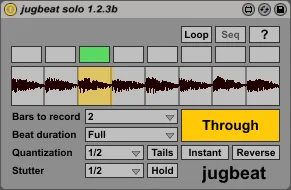
jugbeat is a free looper device, which is built around the idea of beat manipulating you might have seen in mlr and similar programs. Following the beat and tempo of your Ableton song, it constantly records incoming audio stream to the internal bar-fold long buffer. Eight equal slices (for 4/4 time signature) of the looped buffer are mapped across eight buttons, inviting you to recall selected beats with proper quantization. Playback can be stuttered and reversed. The buffer can be locked for a while, therefore providing elementary looper capabilities.
jugbeat comes in two implementations - 'Solo' device and much more powerful controller versions (featuring master device that conducts an orchestra of controller-specific track devices).
Launchpad (by Novation) is the only controller supported by now, as it is the sole grid controller I own. Probably the device would also work for Launchpad Mini and Launchpad Pro.
Tech demo: https://youtu.be/hqXjCZFpXiQ
I am highly interested in creating versions for other popular grid controllers, Ableton Push in the first place. I need to purchase those, so I humbly ask for targeted donations. Core device will also grow strong, sequencer is a priority goal.
Project page: http://empytree.com/projects/jugbeat
GitHub page: https://github.com/empytree/jugbeat
Please, donate: https://paypal.me/empytree/1
Written in Max 5.1.9, tested in Ableton Live 8.2.5.
Briefly tested in Max 7.0.3 and Live 9.1.7.
Tested with automation in Max 8.0.2 and Live 10.0.6.
jugbeat is currently beta. Do not hesitate to report bugs as GitHub issues or via credentials specified in LICENSE file.
Comments (15)
Thanks for contributing. I've been looking for this type of looper for ages. I immediately downloaded it and hooked it up to my launchpad mini. Implementation works really well. The slots are being triggered properly. BUT there is no sound coming from the buffer. Audio seems to be recorded. At least this is what the waveform is telling me, but upon pressing a button on the launchpad audio just drops out and then jumps back to the input audio. I've not hooked up my laptop to a proper audio card for the test though. Instead, I've been trying it out on an ASIO4all driver. Might that be the problem?
We'll try together to work out this problem!
Shame on me! And thank you for the idea! I totally forgot about MIDI power. Of course there should be a MIDI controlled version, I'll think of its design!
No problem, I think built-in sequencer is enough
But I wonder if it's possible to create sequencer in mlr-like-style?
I watch this video and I notice that mlr has a feature which allows to record a certain sequence of actions, I hope you understand what I mean https://vimeo.com/42090723 (at 2:30)
Je met le :
amxd MASTER sur la piste master Ableton
amxd TRACK sur une piste Ableton
Je met l'option "launchpad Mk2" sur amxd MASTER et amxd TRACK
J'appuis sur utilisateur 2 de mon Launchpad mk2
mais rien ne fonctionne... Help ??
Thanks
Try the following:
1) Create new Live set;
2) Open MIDI preferences;
3) Change control surface for your device from "Launchpad MK2" to "Launchpad";
4) OR - even add another control surface "Launchpad" with the same input and output;
5) Try to put .amxd devices to tracks, and select "Launchpad" there.