AwJe Chord Split
Say you play a chord, consisting of the notes C, E and G. Ch...
- Type
- MIDI Effect
- Author
- AwkwardJesus
- Version
- 1.0
- License
- None
- Live version
- 10.1
- Max version
- 8.1
- Downloads
- 1,799
- Updated
- 2020-07-06
AwJe Chord Split is a MIDI Effect for Ableton Live by AwkwardJesus, distributed as freeware, with no license specified by the author. It targets Live 10.1 and Max 8.1. On maxforlive.com it has 1,799 downloads. Published 2020-07-06. 10 user comments below.
New to Max for Live? Read what MIDI Effects do, how device licenses work, how to install a device.
Description
Say you play a chord, consisting of the notes C, E and G. Chord Split allows you to send each note to a different MIDI track. Track 1 receives C, Track 2 receives E, Track 3 receives G. What is this good for? 3 example applications:
1) You can let each voice of a chord be played by a different synth, causing for interesting complex textures.
2) Play a melody with overlapping notes for glitchy sounds.
3) Jacob Collier-style voice-chords in combination with a MIDI-capable pitch correction plugin.
Here's how it works:
Chord Split supports up to 8 voice polyphony. Create up to 8 MIDI tracks, each with an instance of Chord Split, and assign each instance a voice number. Arm any of these channels and play a chord. The notes will be split in order they are played. The first note goes to voice 1, play a second note on top and it will go to voice 2, another one on top will be voice 3 and so on.
Chord Split is sender and receiver at once. It doesn't matter which of the tracks you use to play the MIDI into, it will split it in the same way according to the voice number. Even further, you could have a MIDI clip playing on all 8 tracks and they all would distribute the notes to each other, causing for a crazy web of complex textures.
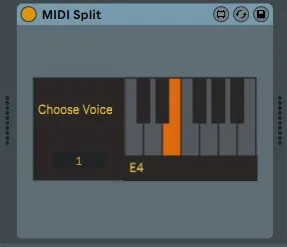
The interface only does 2 things: You can pick what voice this instance represents and it shows you what note it received last.
Enjoy!
Any feedback is gladly appreciated!
---------------------------------------------------------------
Combine this with my MIDI Drone ( https://maxforlive.com/library/device.php?id=6430 ) for multitimbral drone madness!
Comments (10)
For example, if I have a progression Cmin to Fmaj, I stay still with C and move just d# to F and G to A, but instead of repeating C as 1 voice it sends F.
Perhaps I will add a "channel" parameter so you can have multiple chord-note groups, rather than the one global instance here.
I ended up opening it up to add a multi-chord/channel capability and found some good paths to simplify the internals. Have a look here https://github.com/zsteinkamp/m4l-ChordRipper
Cheers!
Search for the midi device "Henry Mancini Wet Dream".