AwJe MIDI Drone
As an artist with a big influence from ambient and noise, dr...
- Type
- MIDI Effect
- Author
- AwkwardJesus
- Version
- 1.1
- License
- None
- Live version
- 10.1
- Max version
- 8.1
- Downloads
- 1,013
- Updated
- 2020-07-13
AwJe MIDI Drone is a MIDI Effect for Ableton Live by AwkwardJesus, distributed as freeware, with no license specified by the author. It targets Live 10.1 and Max 8.1. On maxforlive.com it has 1,013 downloads. First published 2020-07-06, last updated 2020-07-13. 3 user comments below.
New to Max for Live? Read what MIDI Effects do, how device licenses work, how to install a device.
Description
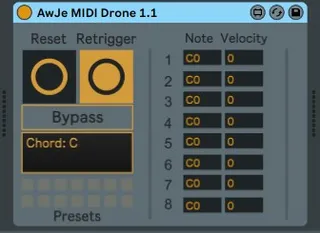
As an artist with a big influence from ambient and noise, drones are a big aspect in producing for me. unfortunately, MIDI clips are sometimes a bit clunky for that, so I made this little guy here: play up to 8 notes and it will sustain them forever. It shows you what notes and at what velocities they were played. It also shows you one possible name of the chord based on the first note you play.
You can reset the drone (the displays sometimes take 2-3 clicks to be back in the beginning, that doesn't intervene with its function though), or bypass it to play on top of it. Fairly simple!
Enjoy!
Any Feedback is gladly appreciated!
UPDATE v1.1:
- Reset now brings the displays back to default reliably
- Retrigger button added
- The displayed pitches and values can now be edited. Simply click and drag or type. After you’ve made your changes, hit retrigger and you will hear the results (only for notes that aren’t set to default C0-0)
- Presets: Up to 14 presets can be saved now by shift-clicking one of the slots in the bottom left.
FUTURE PLANS:
- measuring and reproducing the timing between notes (so that modulation interferences between the played notes aren't lost when retriggering)
- per-note retrigger and mute
--------------------------------------------------------------
Combine this with my Chord Split ( https://maxforlive.com/library/device/6429/awje-chord-split ) and you are ready for multitimbral drone-madness.
Comments (3)
just set the loop bracket like this: https://i.imgur.com/yDzrfSj.png
As wetterberg has said, you can sustain notes in live, but if you can manage a Retrigger feature, this would be a powerful little device!