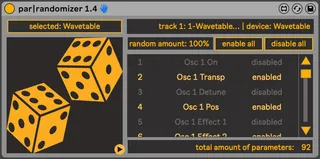
par-randomizer
Simple device that gets you randomising all or a selection o...
- Type
- Audio Effect
- Author
- Sanders
- Version
- 1.4
- License
- AttributionShareAlike
- Live version
- 11.3.2
- Max version
- 8.5.4
- Downloads
- 0
- Updated
- 2025-11-29
par-randomizer is an Audio Effect for Ableton Live by Sanders, distributed as Creative Commons Attribution-ShareAlike. It targets Live 11.3.2 and Max 8.5.4. First published 2020-11-12, last updated 2025-11-29. 28 user comments below.
New to Max for Live? Read what Audio Effects do, what the AttributionShareAlike license means, how to install a device.
Description
Simple device that gets you randomising all or a selection of parameters of any device instantly. Just load it in, select a device and start exploring the unexpected results of randomisation. Works on any device, for vst's you will have to configure the parameters you want to access (this is an Ableton limitation).
Quick tip: if you click the configure button and change presets in your vst, quite often all the changing parameters will be added.
Updates:
1.1: added amount parameter allows for a lot more nuance: from tiny incremental changes to full randomness, and everything in between.
1.3: as the device seemed to stop working for some due to some update after Ableton 11, it was time for a bigger rehaul:
Now, the device to be randomised is selected, instead of being based on the position in the chain. This prevents it from switching/breaking/loosing the enabled-disabled list when the order of devices changes.
Efficiency has been further improved, changing any number of parameters should be instant.
UI tweaks
1.4: fix for displaying the selected device properly on reload of the liveset
UDPATE: there's a new version, with fixes and many more features, you can find it here:
https://maxforlive.com/library/device.php?id=14031
Comments (28)
That’s odd, never had that before. Are the parameters enabled?
Try a restart or a different liveset to see if the problem persists.
im curious, is there a way to make it remember the last device it attached to? so when you reopen the project you don't have to re-attach it to all the devices again. ty again!
Then again, there's some functions like modulation that par|randomizer doesn't have, so depending on your use-case one or the other might serve you best.
Hm, good of you to call out that Par|randomizer also works with dropdowns and other UI controls, there's something I wanted to do with that recently that Device Randomizer wouldn't let me.
The later updates already work a bit differently from the first version, no more left/right side controlling, it was a bit too iffy and easy to break (switching things around etc.). Now it actually works even more similarly to the Device Randomizer it turns out :p, you simply select the device you want to control.
Overall the par|randomizer seems to be more robust. The Innards of the Device Randomizer look scary! XD
Overall only big advantage of my version is that there's no limitations on parameters to randomize.
BTW, note that there are certain parameters that Ableton does not expose, so these can't be randomized! For example the wavetables in the Wavetable device are simply not accessible to M4L. Generally, the parameters that are mappable, are randomizable. Just so you know!
- I just bought par|randomizer and am really happy so far with how easily it integrates into my workflow. I targeted it at Fors Chiral (per a suggestion from the creator, Ess, to find an Ableton randomizer to use it with) — and YES! I see it can access controls the Device Randomizer can. With a few clicks I have the satisfaction of fresh new sounds with it. You can surely bet I'll be trying this with other instruments & effects.
- I like how you made the panel collapse and simple by default, the big dice 🎲 in AMBER makes me smile. I have a soft spot for that color. Any reason why you picked that?
- Are you able to update the device Description at the top of this page so the "choose a side" is revised?
- Has been easy for me to do Enabled/Disabled for different controls in the expanded side panel. Smart layout.
- Also very admirable how you're replying to comments about it coming up on 3 years later. I see various promising M4L devices that get abandoned, or cool concept but no updates or support. I hope this will continue. Thank you.
Thanks for the support! It's truly appreciated to hear some feedback, instead of countless anonymous downloads :)
Glad you're enjoying the UI! Also really love that color, it's actually the official LCD color scheme of the default Ableton theme. I chose to stick to theme colours, so they dynamically adjust according to people's chosen Ableton theme.
It's always surprising how much time, effort and thought sinks into working out decent design decisions. The devil's truly in the details. Just look at some of the things Ableton releases as official M4L devices!
So, thanks again for the encouraging comment!
p.s.: I'll adjust the description.
I'm delighted to hear that! I do hope others chime in and share their happy stories using your tools.
Oh gosh I'm so far away from the base Ableton look now, I have a dark mode skin on so the amber really "pops" even more. Like a retrocomputer.
And YES — you have a great eye and ear for the design, it makes a difference with repetitive workflow actions, and really adds up.
Are there certain devices you really enjoy using par|randomizer with yourself? I am obsessed with MPE (and saw you had another MPE device), so of course I've taken to using it with Drift and the other newly-empowered Ableton devices. And from what I discovered in this library, this benefits a lot: https://maxforlive.com/library/device/8993/pyr-by-iftah-a-microtonal-string-model
The only issue i have is if i change preset from a vst, the first time when i press the randomize button all parameters that i have enabled for randomizing jumps pretty high (about 30%) even if i set the randomization amount 0%
This happens only if i change a preset and only the first time when i press the randomize button. All the next time it respond well
Anyone have the same issue?
And thanks Sanders!
Is it possible for you to make the scroll menu a "floating window" or "expand mode" so we can see all the parameters to disable/enable without scrolling ? I think it would be more time efficient. Cheers !
I also have this device however at the time of launching Analog, Operator, Massive, Sylenth 1 or Synth1.
I select all the parameters as Sander says, I randomize, randomize the parameters but nothing happens, it doesn't give any sound.
Can you explain in detail how to make it work?
Thanks!
- Add Analog to a track.
- Add par-randomizer 1.4 to a track.
- In par-randomizer 1.4, click "select device".
- Then click Analog's title bar.
- Click "confirm device".
- Click the two big dice icon several times.
You should see Analog's parameters changing. Sometimes there will NOT be sound if it changes the levels to be low and such. This is where you might want to click > in par-randomizer and selectively limit parameters.
Are you at least seeing/hearing something similar to this?
If you ever give it another overhaul, would it be possible to set a minimum and maximum range value in a column to the right per parameter?
So, for example, could set the wet/dry parameter to 50-90% so that when you hit the global randomise button it will randomise within that selected range. That way you could still generate random results but have it a little more controlled on some of the parameters :)
Hope you're well, thanks!
• intelligent randomization: randomization balanced around the current value, reducing bias towards center
• Mappable global range control
• Individual parameter range control
• Individual parameter min & max control
• parameter list with inline range, min & max editing
• floating window for larger parameter list & controls
• parameter smoothing for more subtle/moving effects.
• retains parameters on re-mapping to device with same parameters (so you can retain parameters even when copy-pasting/duplicating par-randomizer 2 and mapped device, or remap to other instance of same device type without losing your settings)
• Full path indication
Hope that suits your needs! You can find it here:
https://fluxwork.gumroad.com/l/par-randomizer-2