Chase Bliss Condor Control
A midi device for controlling the Condor pedal via control c...
- Type
- MIDI Effect
- Author
- bagnolessa
- Version
- 1.2
- License
- None
- Live version
- 11.3.3
- Max version
- 8.5
- Downloads
- 112
- Updated
- 2023-06-24
Chase Bliss Condor Control is a MIDI Effect for Ableton Live by bagnolessa, distributed as freeware, with no license specified by the author. It targets Live 11.3.3 and Max 8.5. On maxforlive.com it has 112 downloads. First published 2021-04-19, last updated 2023-06-24.
New to Max for Live? Read what MIDI Effects do, how device licenses work, how to install a device.
Description
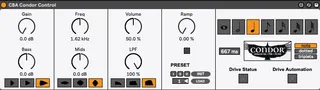
A midi device for controlling the Condor pedal via control changes.
I tried to make a match as close as possible for the knob that selects the cutoff frequency for the mids.
The manual states that it varies between "150 Hz, Noon is around 1250Hz, and all the way clockwise is a little over 4kHz".
Taking measurements with Smaart, I found rather that it started from 115 Hz to go up to about 5200 Hz :-)
Unfortunately the pedal doesn't accept any midi clock; there is no command that allows a tap tempo or anything that can reset the ramp time.
The only thing that came to my mind to create a time-based effect for Live was messing around with the CC # 103, a.k.a. the "bypass switch" control.
An automation allows to switch between the on/off status of the drive parameter.
And this alternation is done according to the bpm of the Live session; you just need to specify what kind of note divisions you want. You can also choose the triplets or dotted variant.
The final effect is a kind of (harmonic) tremolo, which can get really crazy when run at dizzying speeds, like with a sixty-fourth note division.