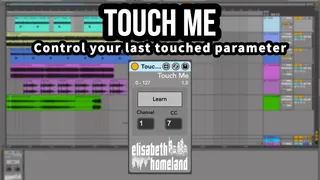
Touch Me - FREE
Touch me is a Free MaxForLive device that lets you map your ...
- Type
- MIDI Effect
- Author
- ElisabethHomeland
- Version
- 1.0
- License
- Commercial
- Live version
- 10.1.18
- Max version
- 8.1.5
- Downloads
- 0
- Updated
- 2025-01-01
Touch Me - FREE is a MIDI Effect for Ableton Live by ElisabethHomeland, distributed as a commercial (paid) device. It targets Live 10.1.18 and Max 8.1.5. First published 2022-12-26, last updated 2025-01-01. 5 user comments below.
New to Max for Live? Read what MIDI Effects do, what the Commercial license means, how to install a device.
Description
Touch me is a Free MaxForLive device that lets you map your midi controller to the last touched parameter in Ableton Live.
Links:
http://www.elisabethhomeland.com
https://youtu.be/2oMFhVvceU0
USAGE:
You can assign a MIDI fader/knob to always follow and control the last touched/selected parameter in your project.
Just press the „Learn” button, and move a fader/knob of your controller.
This is a good solution if you like writing automation with a controller but you don’t want to MIDI map the parameters every single time.
The download contains two devices:
one that good for „Absolute” CC-s (if your controller sends out values between 0-127)
and an „Endless” version. (if your controller only sends out two values)
DISCLAIMER:
- These are MaxForLive devices so you’re gonna need either Live suite, or Live standard with MaxForLive.
INSTALLATION :
you can put these devices into your user library, basically anywhere.
Default location of the User Library:
When you install Live for the first time, the User Library is created at this location: Windows: \Users\[username]\Documents\Ableton\User Library
Mac: Macintosh HD/Users/[username]/Music/Ableton/User Library
Please note that Live has to analyse your user library after you put your devices in there... It could take a while. For the time being, you can just drag and drop these devices on your track from your user library. until Live analyses your folders.
Contact:
If you have any questions or difficulties with the device feel free to write me at :[email protected]
Or you can find me in Twitter: https://twitter.com/ElisabethHom
Have Fun!☺
Comments (5)
VariSpeed must be the revolutionary device of 2022!
thank you for this one too!
Not really the live.object adds the parameter selection to the undo history but that's about it. the actual parameter modulation makes only one undo step.
Discopandis:
Happy holidays for you too :)
Aoxomoxa:
Yeah thats kind of intensional :D
Thank you, I'm happy that you like it :)
I suspect @audiojet asked that in part because there've been previous M4L "one knob" devices that did not have a clean Undo process (such as "ONE 2.0"), making them difficult to use in practice.
I'm giving yours a go now...