Note Triggered Modulator
This device is a variable-length parameter sequencer that ad...
- Type
- MIDI Effect
- Author
- dennisdesantis
- Version
- 1.2
- License
- None
- Live version
- 11.3.20
- Max version
- 8.5.6
- Downloads
- 2,787
- Updated
- 2024-01-22
Note Triggered Modulator is a MIDI Effect for Ableton Live by dennisdesantis, distributed as freeware, with no license specified by the author. It targets Live 11.3.20 and Max 8.5.6. On maxforlive.com it has 2,787 downloads. First published 2023-04-24, last updated 2024-01-22. 5 user comments below.
New to Max for Live? Read what MIDI Effects do, how device licenses work, how to install a device.
Description
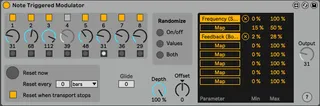
This device is a variable-length parameter sequencer that advances one step each time it receives a MIDI note.
Each of the eight steps can be toggled on or off. Disabled steps are skipped.
Up to eight parameters can be modulated, with indepedent scaling per parameter.
version 1.2
Dennis DeSantis
January 22, 2024
Changelog:
v1.2 (January 22, 2024)
- the min and max controls are now mapping targets and can be automated
v1.1 (April 29, 2023)
- added randomization controls for values, toggles or both
v 1 (April 24, 2023)
- initial release
This device is inspired by two earlier Max for Live devices:
Note Trigger Step Sequencer 1.0 by Prebentious
(https://maxforlive.com/library/device/129/note-trigger-step-sequencer)
Note Trigger Parameter Step Sequencer 2.0 by dfodel
(https://maxforlive.com/library/device/5832/note-trigger-parameter-step-sequencer)
Known issues:
- If a MIDI note or computer keyboard key is mapped to Reset Now or the randomization buttons, every other press of the key or note will be ignored. Mapping this button works best with a footswitch.
- Live’s automation can’t represent triggering a momentary button. In order to automate Reset Now or the randomization buttons, it’s necessary to automate turning them on AND off.
- When automating Reset Now or the randomization buttons, it’s necessary to place the automation slightly before the time when you would like it to occur.
- At extremely fast tempos or when changing meters, the Reset every x functionality may not work reliably.
Comments (5)
Thank you for this device, looks awesome! I've been looking for this for a long time.
Do you think it would be possible to implement a control which shifts the starting position in the sequence? like a discretized version of the phase shift control in the LFO device. I think such a feature would be very useful (at least for me) for creativity, etc..
all the best!
This is possible to do, and is actually available in the related devices I mention (https://maxforlive.com/images/screenshots/?ss=note%20seq.jpg&id=129 and https://maxforlive.com/library/device/5832/note-trigger-parameter-step-sequencer).
I deliberately didn't put this in my version, though, because I thought it would be a bit complicated to have these options alongside the options for disabling steps.
Can you describe a bit about what you want to do that you can't do by disabling specific steps?