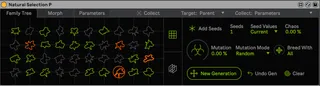
Natural Selection P
Natural Selection explores an evolutionary process with soun...
- Type
- Audio Effect
- Author
- ndivuyo
- Version
- 1.0
- License
- Commercial
- Live version
- 10.1.43
- Max version
- 8.6.2
- Downloads
- 0
- Updated
- No Updates
Natural Selection P is an Audio Effect for Ableton Live by ndivuyo, distributed as a commercial (paid) device. It targets Live 10.1.43 and Max 8.6.2. Published 2024-08-06. 4 user comments below.
New to Max for Live? Read what Audio Effects do, what the Commercial license means, how to install a device.
Description
Natural Selection explores an evolutionary process with sound design! It treats the parameter values of presets as DNA values which are mixed together and mutated over generations to create new sounds. You play the role of the environment, selecting preferable sounds to continue to pass their DNA to the next generations. And over the generations the sound will evolve closer to your preferences. Sound design with your sonic intuition, without even touching the synth parameters (unless you want to;))! There are two versions of Natural Selection. This device, Natural Selection P, can mix and mutate presets of any external device or rack of devices in Ableton to discover new sounds and combinations. Check out the features and videos below to understand more the evolution system!
Promo vid:
https://www.youtube.com/watch?v=4y8y83dO4c8
Walkthroug vid:
https://www.youtube.com/watch?v=U7P_T2ZHVbU
The other version - Natural Selection S - applies this process to an internal versatile poly synth + rhythm generator + effects system without any limitations!
The design of these devices is by River Marchand
Features:
Genetic algorithm that treats parameter value presets as a genotypes or 'DNA'. New ‘child’ presets are created by mixing 2 parents’ parameter values to create new generations of presets (all generations forming a 'Family Tree' of presets). Some of the functions included in this system:
Mutation amount and two mutation modes
Ability to limit the number of generations copulating for a new generation
Ability to start a new tree of presets from those of a previoius tree
Two modes for adding 'seed' presets: (1) current values of the device with optional random spreading (this way you can also load in adv presets and add them as seeds to the tree). (2) Randomized seeds
Functions for remixing parent presets DNA to create a new child and for saving the current parameter values into any child's DNA
Rating system to add bias to certain genetics when creating a new generation
Two page UI for navigating the various generations and children of presets
A section where you can morph up to 8 presets with two XY quadrants and a blend slider between them
For this device, the genetic preset system applies to presets of any external device or rack of devices in Ableton
A section where you can manage the targeted parameters from the target device(s):
Ability to toggle a parameter being included in the genetic preset system or not
Ability to scale the value range of any parameter for the genetic preset loading to function within
Toggle to automatically filter out problematic paramaters to target such as a 'Device On' parameter
Functions for selecting or deselecting all parameters for a selected device
*** LIMITATIONS AND CAVEATS OF USING THIS DEVICE. VERY IMPORTANT READ ***
This device works with external devices parameters. Therefore, it can only work with parameters that are Automatable and Visible. What this means is that the only parameters it (and any device for that matter) can access and set are ones that you can MIDI map and automate and map to macros. So parameters like Wavetable’s waveform selection, or any newer devices modulation matrix, or Operators’ custom partial multislider, etc etc cannot be accessed by this device and therefore can not be included in the child/seed preset creation, mixing and recollection. Additionally and similarly there are big limitations with plugins. The only plugin parameters it can access are the ones that are set visible through the 'Configure' process. Ableton only allows up to 127 parameter values in a plugin to be exposed, so Natural Selection P can only collect up to 127 values from presets to use, and of course complex parameters in a plugin that can’t be exposed to Live can’t be used.
So this means that if you want to use Natural Selection P to mix entire presets then you won’t be able to do that for cases mentioned above. Now that doesn’t mean you can’t use it at all on those devices, but maybe not in ways of evolving entire presets. For example, maybe you can;t change Wavetable’s modulation matrix at or or selected wavetable waveform. But you could still evolve and mutate a patch that includes other parameters of it, or the macros of a rack it is in, etc.
So if you do want to evolve complete entire presets of external devices, you will have to use more basic ones such as Operator, all the OG effects, etc, or plugins that don’t have over 127 parameter values. This is also the reason I made the other device, Natural Selection S, which applies the same evolution process to an internal synth/rhythm generator/FX engine.
more:
dillonbastan.com
dillonbastan.com/store
Comments (4)
The other version of this device, Natural Selection S, instead has its own internal synth rather than work on external devices/racks of devices. I hope that clears it up?