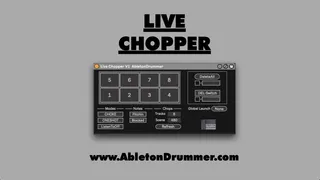
Live Chopper
The Live Chopper Max for Live Device is a fast and easy way ...
- Type
- Audio Effect
- Author
- AbletonKurse
- Version
- 1.0
- License
- Commercial
- Live version
- 12.0.5
- Max version
- 8.6.2
- Downloads
- 0
- Updated
- No Updates
Live Chopper is an Audio Effect for Ableton Live by AbletonKurse, distributed as a commercial (paid) device. It targets Live 12.0.5 and Max 8.6.2. Published 2024-08-05.
New to Max for Live? Read what Audio Effects do, what the Commercial license means, how to install a device.
Description
The Live Chopper Max for Live Device is a fast and easy way to re-sample any audio in Ableton Live. You are able to record and re-trigger live audio signal e.g. your voice via a mic.You can then trigger those samples on the fly right away. The device works with any kind of MIDI controller which can send MIDI notes including the Ableton Push 1-3, MPD, electronic drum pads, or even your computer keyboard. Check out more Max for Live devices here:
https://maxforlivedevices.com/
-------------------
All Devices - https://maxforlivedevices.com/category/all-devices/
Collections - https://maxforlivedevices.com/category/collections/
Control - https://maxforlivedevices.com/category/control/
Free - https://maxforlivedevices.com/category/free-max-for-live/
Hardware - https://maxforlivedevices.com/category/hardware-control/
How To and FAQ - https://maxforlivedevices.com/category/faq/
MIDI Tools - https://maxforlivedevices.com/category/midi-tools/
Max for Live not only for drummers:
https://blog.abletondrummer.com/free-max-for-live-devices/
How to install Max for Live devices:
https://blog.abletondrummer.com/how-to-install-max-for-live-devices-in-your-user-library/
List of best Max for Live for live music performance in 2022:
https://maxforlivedevices.com/best-max-for-live-devices-in-2022/
How to get Max for Live devices:
https://maxforlivedevices.com/how-to-get-max-for-live-devices/
Frequently Asked Question and How To Max for Live:
https://maxforlivedevices.com/category/faq/