- Type
- MIDI Transformation
- Author
- an21
- Version
- 1.0
- License
- None
- Live version
- 11.3.35
- Max version
- 8.5.8
- Downloads
- 375
- Updated
- 2024-11-08
Note to Map is a MIDI Transformation for Ableton Live by an21, distributed as freeware, with no license specified by the author. It targets Live 11.3.35 and Max 8.5.8. On maxforlive.com it has 375 downloads. Published 2024-11-08. 1 user comment below.
New to Max for Live? Read what MIDI Transformations do, how device licenses work, how to install a device.
Description
*** In english ***
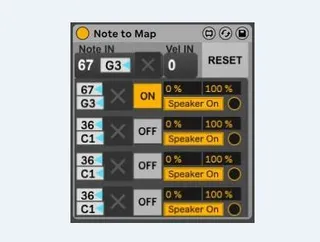
Select your note you want to map to something. That's it !
You can put several devices on the same track, it will increase the number of map. Dont worry, the notes used as target are stop by the device, even in OFF mode, no conflict. You can also use Note to Map to block some notes.
I made this for clyphx. It's hard to map something without a virtual midi loop, and I dont really like it.
You can make a midi clip and these notes would make automation.
You can say to clyphx to play this midi clip, and the Note to Map will do the tricks.
Really usefull to delete tracks clip session with this really handy DeleteClips : https://maxforlive.com/library/index.php?by=any&q=delete+clips
If you appreciate my work, you can buy me a coffe.
https://buymeacoffee.com/an21
*** En français ***
Sélectionne la note qui va servir au mappage du parametre de ton choix, et puis voilà.
Tu peux mettre plusieurs Note to map à la suite sur la meme piste, ca va augmenter le nombre de maps.
Les notes utilisées comme cibles pour mapper ne passent pas à travers le device, elles sont bloquées, meme sur OFF. On peut aussi utilisé Note to Map pour bloquer des notes
J'utilise ça avec des clips midi sur la piste où Note to Map est posé.
Les clips midi peuvent servir de conduite midi pour piloter Ableton.
Clyphx a du mal à effacer les clips des pistes. J'ai fait Note to Map principalement pour pallier à ce problème en utilisant le tres chouette DeleteClips qui marche vraiment tres bien : https://maxforlive.com/library/index.php?by=any&q=delete+clips
Toujours pareil, si vous aimez mes inventions, vous pouvez payer le café.
https://buymeacoffee.com/an21
Comments (1)