Perfect Storm
A free Ableton Max for Live device that effortlessly and nat...
- Type
- Instrument
- Author
- subsocials
- Version
- 1.0
- License
- Commercial
- Live version
- 11.3.41
- Max version
- 8.5.8
- Downloads
- 0
- Updated
- No Updates
Perfect Storm is an Instrument for Ableton Live by subsocials, distributed as a commercial (paid) device. It targets Live 11.3.41 and Max 8.5.8. Published 2025-03-01.
New to Max for Live? Read what Instruments do, what the Commercial license means, how to install a device.
Description
A free Ableton Max for Live device that effortlessly and naturally generates a perfect immersive binaural storm experience.
This binaural thunderstorm generator is built on our own library of ambisonic field recordings from around the globe. With a variety of storm layers and loops, we designed a Max for Live instrument that seamlessly generates realistic rain and storms with different energies and natural sounding changes over time. You can control the storm yourself, automate it over time, and modulate its controls, but it will still behave erratically enough to remain as natural as possible. Sometimes you might even hear some birds, or the backdrop of rain hitting leaves in the jungle.
Create an endless realistic sounding storm that lasts as long as you want.
Use MIDI and automation to plan and shape your storm over time.
Design scenes or sequences with rain and thunder that evolves over time.
Use as a backdrop, intro, outro, or texture anywhere you need it in your music productions.
Just turn it on and chill if you like.
Create your own meditation app?
This is the first in our series of generate Spatial Audio devices. We hope you enjoy your new storms.
Life isn't about waiting for the storm to pass...It's about learning to dance in the rain.
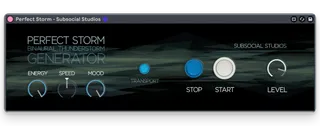
The Controls
LEVEL
Output level control for your perfect storm.
Use this control if you want instant control over the level of your designed storm.
ENERGY
Increase for more storm energy.
The storm intensity will increase and decrease like a real storm.
At MINIMUM there is only light rain.
You have general control of the storm energy, but it acts unpredictably enough to sound real.
SPEED
Increase to speed the storm up, lower to slow the storm down.
Speed changes will happen slowly to sound more natural.
MOOD
Increase to be outside in the storm.
Decrease to be cozy inside.
START
Naturally Start the Storm.
The storm will start over a period of time that sounds more natural.
STOP
Naturally stop the storm.
The storm will stop over a period of time that sounds more natural.
TRANSPORT
Link your project's transport.
Perfect Storm automatically mutes when stopped.
• Minimum requirements: Ableton 11.3+ Suite
• 1 Ableton Max for Live Device (1 .AMXD file)
• 96k/24bit True Binaural .wav sources.
• Designed in Vancouver, Canada by Subsocial Studios.