- Type
- MIDI Effect
- Author
- PELILI
- Version
- 1.0
- License
- Attribution
- Live version
- 11.0.0
- Max version
- 8.5.8
- Downloads
- 250
- Updated
- No Updates
The Shaker is a MIDI Effect for Ableton Live by PELILI, distributed as Creative Commons Attribution. It targets Live 11.0.0 and Max 8.5.8. On maxforlive.com it has 250 downloads. Published 2025-10-28.
New to Max for Live? Read what MIDI Effects do, what the Attribution license means, how to install a device.
Description
THE SHAKER
The idea behind is to use a sections of music files in a folder, and the shaker will create loops from random selections of those tracks. Like throwing a bunch of different materials into a shaker and geting a chaotit but musical rsult.
I've used it in many compositions and situations, both live and in the studio.
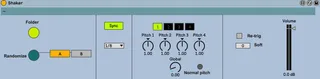
1. Press "Folder" button and select a folder containing sound files (Shaker will search also in subfolders).
A random selection of 8 loops will be made out of all the files.
ATTENTION: if you select a folder containing a lot of subfolders (like the iTunes library) it will take a while to scan.
2. Press PLAY in live to start.
3. Select one of two banks A or B. When pressing "Randomize" button, a new random selection will be made in the bank that is actually NOT playing.
4. Swap between "Sync" or "Manual" to manually select loop 1, 2, 3 or 4.
5. Choose a different rate in the little menu.
6. Play around with the pitchs of each loop and the global pitch.
7. "Re-trig" mode will start the loops everytime from the begining.
8. "Soft" will soften the begining and end of each loop.
ENJOY and credit if used please!
fedepablo.com