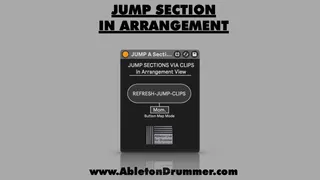
Jump Sections in Arrangement View
Jump Sections in Arrangement View in Ableton - Max for Live ...
- Type
- MIDI Effect
- Author
- AbletonKurse
- Version
- 1.0
- License
- Commercial
- Live version
- 12.0.5
- Max version
- 8.6.2
- Downloads
- 0
- Updated
- No Updates
Jump Sections in Arrangement View is a MIDI Effect for Ableton Live by AbletonKurse, distributed as a commercial (paid) device. It targets Live 12.0.5 and Max 8.6.2. Published 2025-12-17.
New to Max for Live? Read what MIDI Effects do, what the Commercial license means, how to install a device.
Description
Jump Sections in Arrangement View in Ableton - Max for Live device
This Max for Live device lets you jump sections in Ableton Live's Arrangement View.
You are able to set up MIDI CLIP to exclude parts from being played in Ableton's Arrangement which lets you quickly set up different non-destructive Re-Arrangements while producing in Ableton Live.
Check out TobiBot for Questions on Ableton Live & Max for Live:
https://blog.abletondrummer.com/ableton-support-chatbot/
Check out more Max for Live devices here:
https://maxforlivedevices.com/
All Devices - https://maxforlivedevices.com/category/all-devices/
Collections - https://maxforlivedevices.com/category/collections/
Control - https://maxforlivedevices.com/category/control/
Free - https://maxforlivedevices.com/category/free-max-for-live/
Hardware - https://maxforlivedevices.com/category/hardware-control/
How To and FAQ - https://maxforlivedevices.com/category/faq
MIDI Tools - https://maxforlivedevices.com/category/midi-tools/
Max for Live not only for drummers:
https://blog.abletondrummer.com/free-max-for-live-devices/
How to install Max for Live devices:
https://blog.abletondrummer.com/how-to-install-max-for-live-devices-in-your-user-library/
How to get Max for Live devices:
https://maxforlivedevices.com/how-to-get-max-for-live-devices/
Frequently Asked Question and How To Max for Live:
https://maxforlivedevices.com/category/faq/