Crosscut - cross track mute groups
Crosscut is an Ableton Max for Live device that makes it eas...
- Type
- MIDI Effect
- Author
- caringembrace
- Version
- 1.0
- License
- None
- Live version
- 12.0.5
- Max version
- 8.6.2
- Downloads
- 0
- Updated
- 2025-12-30
Crosscut - cross track mute groups is a MIDI Effect for Ableton Live by caringembrace, distributed as freeware, with no license specified by the author. It targets Live 12.0.5 and Max 8.6.2. Published 2025-12-30. 2 user comments below.
New to Max for Live? Read what MIDI Effects do, how device licenses work, how to install a device.
Description
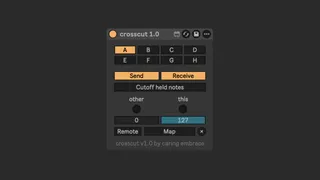
Crosscut is an Ableton Max for Live device that makes it easy to build mute groups (or choke groups), even when your devices aren't part of a drum rack.Use it to write bass lines using multiple synths that cut each other off or to build live sets that cleanly integrate multiple samples.
Compatible with Live 12+ only, for now.
The device works by sending information about notes between instances of the device and setting a mapped parameter to either the "This" value or "Other" value, depending on which track the notes come from. Optionally, the device can also cutoff any ongoing midi notes currently playing on the track.
By mapping the gain control of a utility device you can create a classic mute group, see the gain.adg file for a premade audio rack you can use to make this easy. You can also map other controls, such as filters or effects, as needed.
By changing the mapping mode from "Remote" to "Direct", the device will change the mapped parameter in a way that gets recorded as automation, allowing you to manually edit the resulting automation to taste. (Expect jank, it's not how you're supposed to do things)
Demo 1: Basic usage
https://youtu.be/_KgRp4qxTNI
Demo 2: Record automation
https://youtu.be/_ytV8uMHqUE
Comments (2)
.adg seems to be for Live 12