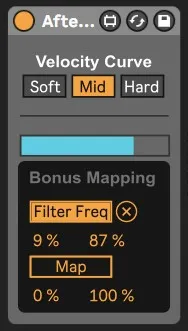
Aftertouch Play
With this device you can play an instrument with channel aft...
- Type
- MIDI Effect
- Author
- Carvr
- Version
- 1.0
- License
- AttributionShareAlike
- Live version
- 11.3.43
- Max version
- 8.5.8
- Downloads
- 97
- Updated
- 2026-03-16
Aftertouch Play is a MIDI Effect for Ableton Live by Carvr, distributed as Creative Commons Attribution-ShareAlike. It targets Live 11.3.43 and Max 8.5.8. On maxforlive.com it has 97 downloads. Published 2026-03-16.
New to Max for Live? Read what MIDI Effects do, what the AttributionShareAlike license means, how to install a device.
Description
With this device you can play an instrument with channel aftertouch, while playing the main instrument on another track normally.
Demo 1: https://drive.google.com/file/d/1it1ohYMZwzeTVXroKc9vJzLkC5OfG6l8/view?usp=drive_link
Demo 2: https://drive.google.com/file/d/1hPINxYkYokmkQQjQ6w8FV3dMSDGKYzS0/view?usp=drive_link
You could play strings while playing piano and express the strings independently. If you want the aftertouch instrument to play in a different key than the main one, you can put Abletons "Pitch" device or even the Arpeggiator after "Aftertouch Play".
It collects all the held down keys to generate the chord and uses the acceleration of aftertouch being triggered to generate the velocity level. You only have to trigger the aftertouch of one single key to play the chord you're holding. With channel aftertouch we only have one signal to work with, so you can't change your chord after triggering it. You have to let go of aftertouch, change the chord and trigger it again.
While playing at different velocity levels, you can add even more expression to your playing by using the 2 mapping channels to map aftertouch to any device parameter, like a cutoff filter. The aftertouch signal is passed right through the device, so you can still use Abletons "Expression Control" device for even more refined mapping.
I was inspired by the Expressive E Osmose MPE-keyboard, but wanted to max out what is possible with normal MIDI and channel aftertouch.
Best regards,
Carvr