Colorizer Auto color tracks and clips . BetterUI
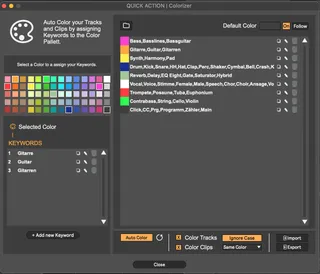
Automatically color tracks and clips in Ableton Live for a f...
- Type
- Audio Effect
- Author
- SillyFryTools
- Version
- 1.0.0
- License
- Commercial
- Live version
- 12.0.5
- Max version
- 8.6.2
- Downloads
- 0
- Updated
- 2026-04-13
Colorizer Auto color tracks and clips . BetterUI is an Audio Effect for Ableton Live by SillyFryTools, distributed as a commercial (paid) device. It targets Live 12.0.5 and Max 8.6.2. Published 2026-04-13.
New to Max for Live? Read what Audio Effects do, what the Commercial license means, how to install a device.
Description
Automatically color tracks and clips in Ableton Live for a faster and more organized workflow.
- Automatic coloring of tracks and clips by name
- Default track and clip color
- Share your color palette with friends
What is BetterUI?
BetterUI is a workflow extension for Ableton Live. It brings together the small but powerful features I always missed — automatic coloring, session cleanup, timecode display, marker management, external sync, tablet control, and more.
What else BetterUI includes:
- Session cleanup
Remove deactivated devices, muted clips, and empty tracks with one click.
- Working time tracking
See how long you have been working on your set or project.
- LTC and MTC output
Sync Ableton Live with other software and external systems in any frame rate.
- Flexible timecode display
Show timecode in Ableton’s menu bar or place it anywhere in your set.
- Marker management
Create markers with a shortcut, manage them in a list, add notes, jump between them, and use webhooks for external actions.
- Tablet and phone control
Control Ableton Live remotely using Mira.
- Options.txt editor
Enable experimental Ableton features without editing text files manually.
- Full session overview
Collapse all windows to create more space and focus on your set.