Move4Live
The Ableton Move gets one thing exactly right: the moment yo...
- Type
- Audio Effect
- Author
- PantaFlux
- Version
- 1.1.1
- License
- AttributionNonCommercialShareAlike
- Live version
- 11.3.13
- Max version
- 8.6.2
- Downloads
- 38
- Updated
- 2026-05-09
Move4Live is an Audio Effect for Ableton Live by PantaFlux, distributed as Creative Commons Attribution-NonCommercial-ShareAlike. It targets Live 11.3.13 and Max 8.6.2. On maxforlive.com it has 38 downloads. First published 2026-04-20, last updated 2026-05-09. 8 user comments below.
New to Max for Live? Read what Audio Effects do, what the AttributionNonCommercialShareAlike license means, how to install a device.
Description
The Ableton Move gets one thing exactly right: the moment you start a new set, you can just play. Four randomly chosen instruments, no setup, no “where do I even begin?” – you're making music immediately instead of making decisions.
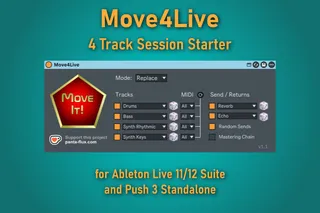
Move4Live brings that idea to the Ableton Push 3 Standalone (NEW in v1.1) and Ableton Live 11/12 Suite on the desktop. One button. Four ready-to-play tracks – e.g. Drums, Bass, Pad, Synth Keys – with randomly selected presets from your library. Add optional return tracks and a mastering chain modeled directly after the one the Ableton Move uses in every new set.
Move4Live is a one-person project and your feedback genuinely matters. I would love to hear about your experience, any bugs you have encountered, feature ideas – or especially whether you got it running on macOS.
IMPORTANT:
CURRENTLY, MAXFORLIVE.COM DOES NOT SUPPORT THE UPLOAD OF THE UPDATED ZIP FILE. THEREFORE YOU HAVE TO DIRECTLY DOWNLOAD THE V1.1.1 FROM MY WEBPAGE.
Direct Download Page: https://www.panta-flux.com/en/products/move4live/
Short Demo Video: https://youtu.be/WmebUtYqWmQ
Full user manual: https://www.panta-flux.com/en/products/move4live/manual/
—
INSTRUMENT TRACKS
· Up to four tracks with freely chosen categories
· Random presets from your installed Ableton library
· Re-roll individual tracks without touching the rest
· NEW in v1.1: Configurable MIDI input channel per track (for external sequencers or jamming with friends)
· ‘Replace’ mode (overwrite existing tracks) or ‘Add’ mode (keep and add tracks)
RETURN TRACKS & MASTERING CHAIN
· Up to two return tracks with random effect presets from a curated selection
· Re-roll individual effects per return track
· NEW in v1.1: Optional random send levels for newly created tracks
· Optional mastering chain: Punch Glue → Compressor → Analog Clip → Limiter (like the Move)
CONVENIENCE
· Settings saved between sessions
· Runs entirely inside Ableton Live – no external app required
—
REQUIREMENTS
· Ableton Live 11.3.13+ or 12 Suite
or Push 3 Standalone
· Max for Live
· Windows 10/11 (verified) · macOS (should work, untested)
—
TECHNICAL DETAILS
· .amxd Audio-Device for Main track
· .adg preset for Move-like mastering chain
· Remote Script (Python) to access core Ableton functionality
—
CHANGELOG
v1.1.1 May 8, 2026
- Fixed: “Move It!” and Reroll buttons behaved as toggles rather than momentary buttons on Push 3 (LED stayed on after pressing). Now everything works as intended!
v1.1 May 5, 2026
· New: Configurable MIDI input channel per instrument track
· New: Random Sends – random send levels for newly created tracks (non-destructive)
· New: Automatic Drum Buss on all Drums tracks
· New: Full support for Ableton Push 3 Standalone (from Push 2.4)
· Fixed: Reroll accidentally loaded two presets in a row instead of one
· Code cleanup
v1.0 April 17, 2026
· Initial release
· Four instrument tracks with random preset selection
· Two return tracks with curated effect presets
· Optional mastering chain
· Replace and Add modes
· Individual re-roll per instrument and return track
· Compatible with Ableton Live 11 and 12 Suite
—
Donationware – free to use. If it saves you time or sparks something, a small tip via Ko-fi is always appreciated.
Comments (8)
I’m not entirely sure what you’re trying to achieve.
You can already enable or disable any slot toggles (orange squares) for instrument tracks, return tracks and the mastering chain.
The way I’ve been using the tool since the prototype is as follows:
• I build a starting session with all four instrument tracks enabled in “Replace” mode.
• I keep two or three of these tracks and disable all instrument slots on Move4Live except one, as well as all return slots (and the mastering chain, which I usually have disabled anyway).
• I choose a sound category an press the “Move It!” pentagon to add one new track.
• If I like the preset, I keep the track; if not, I click “Reroll” for that slot and let the system assign a different random preset to the track.
This way, you can gradually add as many instrument tracks or return tracks as you like – always one (or up to four instruments and up to two effects) at a time.
I'd probably use/misuse your device more often in sets where there is a structure and channels already and hitting the pentagon (replace on all four options), but that takes all the channels down to four which deletes a WIP, but that is the Move way and what the device is about so I understand that. Fun as is though. Thanks!
But adding more user-defined sound pools (e.g., custom directories, custom combinations of categories and tags) instead of or in combination with the current categories is on my to-do list. I just need to find the time to implement the whole thing reasonably securely.
Thx and congrats on your work.