- Type
- MIDI Effect
- Author
- Benoit
- Version
- 0.1
- License
- Attribution
- Live version
- 12.0.5
- Max version
- 8.6.2
- Downloads
- 0
- Updated
- 2026-07-31
Zone is a MIDI Effect for Ableton Live by Benoit, distributed as Creative Commons Attribution. It targets Live 12.0.5 and Max 8.6.2. First published 2026-07-07, last updated 2026-07-31.
New to Max for Live? Read what MIDI Effects do, what the Attribution license means, how to install a device.
Description
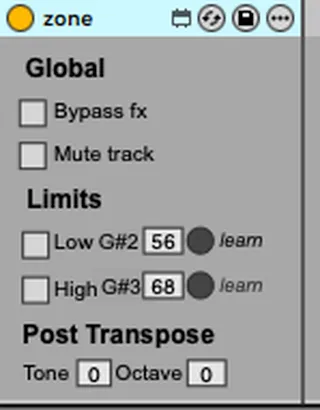
Zone — one tiny MIDI effect per instrument that plays only the keys you give it, then transposes the result. The split point never moves when you transpose.
• Up to 5 named boundary notes. Each note can be a Min (low bound, inclusive) and/or a Max (high bound, exclusive). Pick one Min + one Max to set the playing zone — Min/Max are radio (at most one of each). Cross them for a notch: play the two ends, mute the middle.
• Transpose AFTER the filter. Octave + semitone shift only the surviving notes, so the split boundary stays exactly where you set it — no matter how far you transpose the sound.
• Mappable, automatable bounds — which Ableton's native key zones can't do. Every note is a real Live parameter. Map several Zones' notes to the same macro/CC and move a shared split across instruments, live. The Max bound is exclusive (p < note), so two adjacent zones sharing a boundary meet with no overlap and never double the note.
• Type it your way. Enter each boundary by note name (A0, C4, F#3…) or MIDI number — both fields sync live (scientific naming, C4 = middle C).
• See what sounds. A per-row dot shows at a glance which notes are inside the zone.
• Bonus — light your split on a WLED strip via the open wled-midi / OpenLamp convention.
• Tone and Octave are also CC-drivable (assignable CC numbers).
Requires Live 12 with Max for Live (built on Live 12 / Max 8.6). MIT — source on GitHub.