- Type
- Audio Effect
- Author
- Bert
- Version
- 1.0
- License
- None
- Live version
- 9.0.6
- Max version
- 6.1.4
- Downloads
- 841
- Updated
- No Updates
Smoothie is an Audio Effect for Ableton Live by Bert, distributed as freeware, with no license specified by the author. It targets Live 9.0.6 and Max 6.1.4. On maxforlive.com it has 841 downloads. Published 2013-11-04. 3 user comments below.
New to Max for Live? Read what Audio Effects do, how device licenses work, how to install a device.
Description
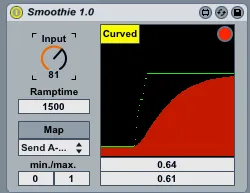
This devices interpolates Midi CCs for extra smooth parameter changes. It was initially made for a live performance where we wanted to change the tempo in a great range and the standard midi resolution of 128 values wasn't sufficient.
This is how it works:
- Put the device on any channel.
- Map the controller of your choice to the Input dial. (preferably a fader or rotary knob - or use it with a range of buttons mapped to one parameter (shown here: http://www.youtube.com/watch?v=YS-e2r5bef0#t=13).
- Set the Ramptime. That is the time lives parameter takes to reach the Input value from the controller).
- Click on "Map" and on any of Lives parameters to control this parameter smoothly.
- Set the minimum & maximum output values for Lives parameter.
- Choose "Linear" or "Curved" mode. Linear mode just interpolates the input values. Curved mode decelerates the parameter movement towards the destination value (sounds complicated but is in fact easy - just try it!)
- By clicking on the red button in the top right corner you can open a floating window showing you the in- and out-values. So you can set the device independently from Lives current view (especially useful when using very long Ramptimes - just quickly set the desired input-value and do something else, while the device does the rest).
For feedback and suggestions: [email protected]
Comments (3)
I'm not the author but I found the same thing and managed to fix it by editing the device, all you have to do is delete the line between the max value box and the message box above it that says "1" then it'll work. That's all.
https://drive.google.com/open?id=1ZV0zYOWh4DD3ynhIoLXWjaBRkdBPah9L