- Type
- MIDI Effect
- Author
- antimaterium
- Version
- 2.3
- License
- None
- Live version
- 9.1.2
- Max version
- 6.1.7
- Downloads
- 9,451
- Updated
- 2020-08-18
Microtuner is a MIDI Effect for Ableton Live by antimaterium, distributed as freeware, with no license specified by the author. It targets Live 9.1.2 and Max 6.1.7. On maxforlive.com it has 9,451 downloads. First published 2014-07-02, last updated 2020-08-18. 28 user comments below.
New to Max for Live? Read what MIDI Effects do, how device licenses work, how to install a device.
Description
2.2
=======================
New in 2.2:
- under certain conditions settings have not been restored, correct tuning only after "touching" PB range, this is fixed now
- furthermore if you load the saved set it will autograb the saved cent value, so you dont have to resend the value....
- you now can also pitchbend your instrument without loosing value
=======================
Thanks for donating.
BTC Address:
13fPZc55jJWfJhe4X57ebKS1jHtXrZmYX5
Exclusive for supporters in 2.3
- Push support (only Live 9)
- Compatibility issues with Max 7 resolved.
Thanks for supporting.
||| http://antimaterium.de |||
---
A enhanced Version of PHY6's inital version of microtuner (http://www.maxforlive.com/library/device/1758/microtuner THX to PHY6!) , inspired by the requirements of antimaterium:
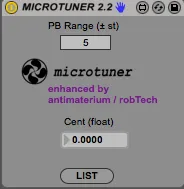
- moving pitchbend wheel doesn't affect the selected tuning
- Parameters (PB Range and Cent) are stored with the live set
- a warning message appears if the PB range is not sufficient for the desired Cent-Detune
Original:
Name/Version: Microtuner 1.0
Author: | PHY6 |
Description: This device tunes your vsti/au's or Ableton instruments to different tuning.
All the instrument needs to get it working, is a pitchbend control and a set range for the pitchbend.
Set the PB range in your synth to match the range in the device and you're set !
So if you want to tune your instruments to 432hz, set the PB range to match that of your synth. And in the box below, the cents (float), enter -31,766.
Now the instrument is set to 432hz.
Hz to Cents converter :
http://www.sengpielaudio.com/calculator-centsratio.htm
Thanks to broc from the Ableton forums.
Comments (28)
does your instrument support PitchBend messages? Then MicroTuner should work (as it does the shifting by a defined pitchbend message); set PB range in Microtuner to the same value as the Pitchbend sensitivity of the Instrument, otherwise the calculation would be wrong.
HTH, cheers Rob
Best,
Marco
=======================
New in 2.2:
- under certain conditions settings have not been restored, correct tuning only after "touching" PB range - this is fixed now
=======================
Would love to see how it works...but I'm not gonna pay for it.
Hope you will remove the money thing...
If you made it from scratch...ok...but altering a device I made (with a little help from someone) and charging money...come on...
Sharing is caring ;)
I think so to. : D
Well you don't have to pay for it. ; )
It is optional.
We all know why I did this. Check Facebook and the Guy who isn't Lance. : )
But I will make 2.2. also available here so you guys don't have to write to me. Although please do if you want to collab or release.
Best,
Marco
did you copy the device (the file MICROTUNER 2.2.amxd) to the User Library Folder (and here in the Folder for Max MIDI Effects) of Ableton Live (e.g. Ableton\User Library\Presets\MIDI Effects\Max MIDI Effect)? If the device file is there, it should show up in Live's Browser.
HTH, cheers
Rob
did you copy the device (the file MICROTUNER 2.2.amxd) to the User Library Folder (and here in the Folder for Max MIDI Effects) of Ableton Live (e.g. Ableton\User Library\Presets\MIDI Effects\Max MIDI Effect)? If the device file is there, it should show up in Live's Browser.
HTH, cheers
Rob
I have the device before the Operater synth and it gets me to A=432 fine, but when I put it in front of the Massive Synth it doesn't work...
any help with this would be much appreciated.
thanks
P
just found out I can global tune the massive synth....
it would still be helpful if the microtuner worked tho for presets...
cheers...
the only reason why Massive does not respond to microtuner is, that in massive the pitchbend sensivity is set to 0. As microtuner does nothing else than sending out pitchbend messages, this could be the reason.
Pls let me know if this helps!
Cheers
Rob
I tried your micro tune, but nothing is happening. Tried Operator as well, but there isn't any PB changing. Even strange PB numbers I tried to the extreme, but nothing is happening. I'm I doing something wrong?
Thanks
Regards,
Lars
you always have to make sure also that the synth actually reacts to Pitchbend Messages in the same amount as specified in MicroTuners PB Range (for example 12 semitones). If the pitchbend sensitivity of the synth is Zero, nothing will, happen (even if you change MicroTuners PB Range) ... ;-)
HTH Rob
I am trying to use the device but it only works with negative values, meaning I can only use the negative cents while with the positive ones the pitch doesn't change.
I have tried both Analog and Operator set with a pb range of 2 and the microtune as well but I can only get the above result.
Thanks
Marco
I am trying to use the device but it only works with negative values, meaning I can only use the negative cents while with the positive ones the pitch doesn't change.
I have tried both Analog and Operator set with a pb range of 2 and the microtune as well but I can only get the above result.
Thanks
Marco
cheers Rob
best regards Rob
I have one question, and i do apologize if it would sound dumb, but i always thought that pitch and frequency is really correlate to each other....
So if you detune pitch, then frequency will change.... but using my spectrum analyzer after detuning my instrument frequency stayed at the same place....
So what i did .... i "detuned" build-in ableton grand-piano instrument and then bounced it as an audio file (just so experiment would be absolute clear) and then i bounced another audio file but without detuning.
And yes, they sound absolutely different! but my spectrum analyzer showing me that there is no difference in frequencies between these two audio files what so ever....
So i have a logical question now..... how it is possible that one piano was tuned to A - 440 and another one to 432.... and yet they share the same shape the same parameters of frequencies.
Again, i am supper noob at this kind of stuff.... but there is no logical explanation at list in my head..... please give me a wisdom ^_^
I have one question, and i do apologize if it would sound dumb, but i always thought that pitch and frequency is really correlate to each other....
So if you detune pitch, then frequency will change.... but using my spectrum analyzer after detuning my instrument frequency stayed at the same place....
So what i did .... i "detuned" build-in ableton grand-piano instrument and then bounced it as an audio file (just so experiment would be absolute clear) and then i bounced another audio file but without detuning.
And yes, they sound absolutely different! but my spectrum analyzer showing me that there is no difference in frequencies between these two audio files what so ever....
So i have a logical question now..... how it is possible that one piano was tuned to A - 440 and another one to 432.... and yet they share the same shape the same parameters of frequencies.
Again, i am supper noob at this kind of stuff.... but there is no logical explanation at list in my head..... please give me a wisdom ^_^
So you are saying u can't see any difference in Spectrum Analyzer when tuning down to 432? This is not possible. What kind of analyzer are you using? Usually the spectrum is the same just more to the left since it is detuned. Just hover with your mouse inside "Spectrum" and there will be a small box in the left corner showing you the exact frequency, note and dB. Basically you can tune just using Spectrum. Although the new Tuner device (Ableton Beta) or Turbotuner (External Tuner) are more accurate. Hope i am understanding you here. If not please be more clear about what you are trying to say.
Thank you.
Best,
Marco
i"m just starting out in Ableton and music theory and prod per se. i would like to start right away with 432 and other frecwencies. i downloaded the device and it is installed and i can drag it to the device area in Ableton. i am not sure now what happens, i have no idea about pitch bend or ranges and the numbers...learning by doing. how can i or what numbers must i enter if i am just using my mouse to make music? can i use the micrtuner just with the mouse or do i have to use a controller?
i have a controller, it the Akai MPK Mini II, it has a pitch bend on it. what numbers must i enter for it into microtuner to get 432?
Any help is appreciated on working without a controller and with the AKAI MPK Mini II
Bests
Steve
Om
Thanks
Unfortunately, this just doesn't work well for many reasons.
1) Some virtual instrument libraries don't work well with pitch bending, which I guess is how this tool is changing the tuning. Plug-ins will either not respond at all to the tuning change, or they will respond but then get 'stuck' in that state so that, even by bypassing the device, the tuning is stuck where it was left.
2) the 'list' of conversions available within the device offer no correlation between the listed 'cent/float' value. In other words, converting from 440Hz tuning to 432Hz tuning is NOT a simple drop in -31.76 cents, as instructed, but rather around -191 cent (tested on a flat test tone generator)