MultiMapper32MIDI
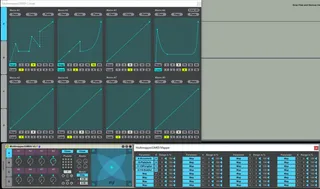
A 32 dial version of my MultiMapper device with tabbed UI. T...
- Type
- MIDI Effect
- Author
- mothergarage
- Version
- 2.7
- License
- AttributionNonCommercial
- Live version
- 9.7.1
- Max version
- 7.3.3
- Downloads
- 4,316
- Updated
- 2017-07-18
MultiMapper32MIDI is a MIDI Effect for Ableton Live by mothergarage, distributed as Creative Commons Attribution-NonCommercial. It targets Live 9.7.1 and Max 7.3.3. On maxforlive.com it has 4,316 downloads. First published 2014-07-09, last updated 2017-07-18. 18 user comments below.
New to Max for Live? Read what MIDI Effects do, what the AttributionNonCommercial license means, how to install a device.
Description
A 32 dial version of my MultiMapper device with tabbed UI. This is a m4l MIDI device, so you can put this as the first device in a MIDI track.
Map any midi-mapable control to the dials. You can save and randomize presets as well as morph the first four presets with an x/y pad.
V1.5.3: Map button now toggles the mapping window.
V1.7: Added button to toggle the morphing pad. Bugfix: The init buttons are now working as expected.
V1.8: Added Numbox to load presets.
V2: BIG UPDATE! Added curves for each dial, which you set in the "Curves" window. Clear, copy or paste them or clear them all. Added a "Master Dial" for each bank, which turns all eight dials at once. Added a reset button "!" to set the whole device back to its initial state.
V2.0.1: Fixed a bug where the curves weren't saved with the Live set.
V2.0.2 to 2.0.4: *skipped*
V2.0.5: Bugfixes, GUI update
V2.1: The button above each dial lets you set the current setting as an individual Inital value. So if you hit the DEL key on your keyboard the dial resets to this value. Bugfix for "Init" settings. GUI cosmetics.
V2.2: Added Mira support.
V2.5: Bugfixes. GUI updates. The curves now reset to linear.
V2.6: The floating windows now open in the center of the screen.
V2.7: Updated Curves window. You can now snap the points of the curve to a grid of variable size. You can loop the curve over various bars. The corresponding dial is deactivated during loop-mode to avoid interferences. Thanks Tom Cosm [http://cosm.co.nz/] for the inspiration and part of the code!
Credits:
Part of the x/y code from XY Send Nodes revised by cosmoddd.
Known issues: Push doesn't correctly display the renamed dials and the crossfader can't be mapped.
Comments (18)
I'm a newbie, but is there anyway to midi map (or otherwise map) the 4 tabs?
Thanks again!
Great device, will be fantastic for controlling an Access Virus Ti with all it's tweakable parameters. After mapping the automated parameters it's working, except that the knob names are not reflected on push. e.g. First knob is called 'Cutoff' and on the push it stays as 'MacroA1', even after switching focus to another device and back again. This makes it very difficult, if not impossible to use on the Push. Any chance of an update to address this?
Thanks heaps, Jon
But thanks for this already, keep up the good work!
There is no way I know of to get Push to display the labels after renaming them.
Can you also change the way your Devices behave when mapped to buttons? I don't like it when Devices turn already on by values above 1... the normal configuration of 64 should work better I think...
Third I'd like to encourage you making your presets mappable to another controller in Live. Preset 1 should be loaded by values of 1-15, Preset 2 by values of 16-30 and so on... This would be cool!
Thanks for this great Device as it is already!
Your first suggestion wont work, because the way Live handles the mapping. It's the same as with Midi mapping, which you can't ex- or import.
I don't know how the button behaviour could work, but I will look into it.
Your third idea has been added to the latest version.
Cheers!
any chance there's gonne be a 2.0 update for the audio version of Multimapper32. really love the editable response curves.
my scenario is using the MM32 device to control and randomise samples inside a drum rack. when I save these drum racks as .alc clips, and bring the clip back in the MM32 macros are reset to zero and the sample selector (drum rack macro) is at a random point.
see the image here to explain further: https://www.dropbox.com/s/icaw0oig6r30b84/MM32%20issue.jpg?dl=0
Great Device! So I found what seems to be a bug. I use the 'random' setting in MaxForLive's LFO, to humanize different parameters in instruments and synths. When I use Multimapper to apply a randomized LFO to both Cutoff 1 and Cutoff 2 of a synth, for example, Live starts recording all of the movements of the multimapped knob into the undo history. The undo function in Ableton then becomes un useable for anything else, as it gets filled with hundreds of undos. This doesn't happen with MaxForLive's LFO in the random setting otherwise - only when I use it with multimapper.
Thoughts?
You can have a look at mAp++, it's not exactly the same type of device, but you can map several parameters and have presets to unmap/remap them...
The way that Live handle the mapping is here a bit skirt.
You can save and load presets files, automate preset changes...
https://maxforlive.com/library/device/6922/map-plus-plus