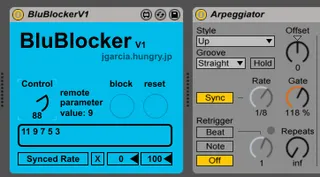
BluBlocker - Block specific values on a parameter
This device is made to block certain values on a dial or sli...
- Type
- MIDI Effect
- Author
- Jdudeo
- Version
- 1.0
- License
- Attribution
- Live version
- 9.1.2
- Max version
- 6.1.7
- Downloads
- 3
- Updated
- No Updates
BluBlocker - Block specific values on a parameter is a MIDI Effect for Ableton Live by Jdudeo, distributed as Creative Commons Attribution. It targets Live 9.1.2 and Max 6.1.7. On maxforlive.com it has 3 downloads. Published 2014-07-09. 3 user comments below.
New to Max for Live? Read what MIDI Effects do, what the Attribution license means, how to install a device.
Description
This device is made to block certain values on a dial or slider, a typical example would be the BluBlocker controlling an arpeggiator sync rate and blocking 1/3, 1/6, 1/12 etc. so when you twist your dial it will skip these values and you can go straight from 1/2 to 1/4 to 1/8. It can be used on any parameter.
Click the box on the bottom left then click the parameter you want to map, use the Control dial to choose a value you want to block and press the block button. Blocked values will show up in the text box below the buttons and you can even write them in yourself, they will always display as integers. To reset the list press the reset button.
Comments (3)