Referencer reference patch
Reference patch for referencing Your work to commercial trac...
- Type
- Audio Effect
- Author
- LAEX
- Version
- 1.2
- License
- None
- Live version
- 9.6
- Max version
- 7.2
- Downloads
- 4,177
- Updated
- 2017-07-02
Referencer reference patch is an Audio Effect for Ableton Live by LAEX, distributed as freeware, with no license specified by the author. It targets Live 9.6 and Max 7.2. On maxforlive.com it has 4,177 downloads. First published 2016-06-12, last updated 2017-07-02. 10 user comments below.
New to Max for Live? Read what Audio Effects do, how device licenses work, how to install a device.
Description
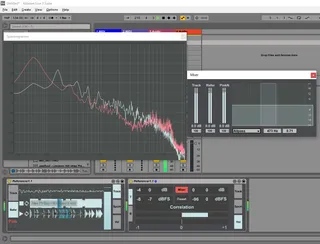
Reference patch for referencing Your work to commercial tracks or pink noise. Just drop this device to end of master track chain and add up to three reference tracks WAV, AIFF or MP3 (my mack machine doesnt support mp3). Set loops at the places you want and compare sounds. Also may choose pink noise.
Spectrum window is visible when You select other tracks.
https://youtu.be/7CYtnh3qpEs
Ver 1.2
Fixed Pink Noise loudness
Added Spectrogramm linear or log selection
Added Spectrum window resize
https://youtu.be/vM-saGBMrbg
Ver 1.1
Fixed RMS calculation.
Added Mixer for volume and width control and Filter for checking defined freq.
For some reasons patch downloaded from here is corrupt and have only 23kb.
Check updated URL (optional) download link.
Comments (10)
- In the darker Ableton themes some fields/buttons have a white font on a light blue black ground, which makes the text unreadable ('float mixer window', 2 fields in
Spectrum tab, and one in the Vsl tab (what stands Vsl for?)).
- The small popup fields on the buttons are very nice, but I discovered them by accident, for they appear rather slowly.
- Also nice detail: explanations in the info view. However, those are not complete (in the update?).
- Might be part of the previous point, but I don't know what correlation means. I do know what correlation in statistics is and means, but does it mean here? In
statistics 0 means no correlation (good or bad exam results, independent of booze or sleep), not related at all, +1 means more of the one always is more of the
other (more sleep, better exam results, less sleep worse exam results all the time), -1 means the opposite, more of the one means less of the other (more booze,
less exam results and v.v., all the time). So does correlation approaching one mean more 'similar' profile as reference track?
In short I think this device deserves some manual or some more attention to info and/or instructions.