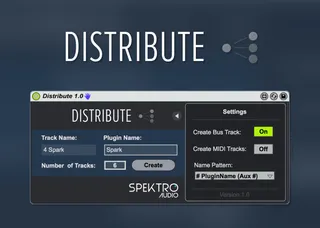
Distribute by Spektro Audio
Distribute improves the workflow of dealing with multi-chann...
- Type
- Audio Effect
- Author
- IcaroFerre
- Version
- 1.0
- License
- Commercial
- Live version
- 9.2
- Max version
- 7.0.4
- Downloads
- 4
- Updated
- 2016-10-10
Distribute by Spektro Audio is an Audio Effect for Ableton Live by IcaroFerre, distributed as a commercial (paid) device. It targets Live 9.2 and Max 7.0.4. On maxforlive.com it has 4 downloads. First published 2016-07-09, last updated 2016-10-10. 1 user comment below.
New to Max for Live? Read what Audio Effects do, what the Commercial license means, how to install a device.
Description
Distribute improves the workflow of dealing with multi-channel plugins in Ableton Live by automating the process of creating, renaming, and routing additional audio and MIDI tracks according to the multi-channel plugin you're using.
By removing the hassle and automating the necessary steps to properly create auxiliary tracks, Distribute let's you save time and CPU power by enabling you to work with fewer instances of the same plugin.
You could, for example, load multiple instruments into the same instance of Native Instrument's Kontakt and use Distribute to automatically create separate MIDI and Audio tracks for those instruments.
You also have the options to create a bus track (to group those multiple channels back together) and to change the pattern that Distribute uses for naming the tracks it creates.
Video Demo: https://youtu.be/9Q_57C40fJc
Comments (1)
Thanks for a great device. Indispensable.