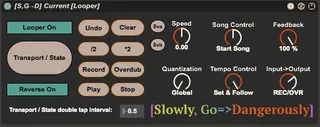
Current Looper by Slowly Go Dangerously
The [Slowly, Go→Dangerously] Current [Looper] is a Max For...
- Type
- Audio Effect
- Author
- SalesAtSGD
- Version
- 1.0
- License
- None
- Live version
- 9.2
- Max version
- 7.0.4
- Downloads
- 3
- Updated
- No Updates
Current Looper by Slowly Go Dangerously is an Audio Effect for Ableton Live by SalesAtSGD, distributed as freeware, with no license specified by the author. It targets Live 9.2 and Max 7.0.4. On maxforlive.com it has 3 downloads. Published 2016-06-01. 5 user comments below.
New to Max for Live? Read what Audio Effects do, how device licenses work, how to install a device.
Description
The [Slowly, Go→Dangerously] Current [Looper] is a Max For Live device that allows you to create a single set of midi mappings that will be applied to the Ableton Looper currently in focus.
The Current [Looper] also provides a mechanism to generate key events that allows you to control the Undo, Clear, “\*2”, “*2”, mini record, mini overdub, mini play, and mini stop buttons via midi as well.
Please take a look at my YouTube walk through:
https://youtu.be/kteUZOlUK1w
You may purchase the Current [Looper] device here:
https://gum.co/SGD-Current-Looper
Thank you for your interest in my work. Your generous support allows me to continue developing tools that allow musicians to more easily pursue their muse.
Comments (5)
This is vic from Slowly, Go Dangerously. I'm sorry I wasn't clear in the video. Let me try again.
What I mean is that the unicode characters generated by the Undo, Clear, /2, *2, Record, Overdub, Play and Stop buttons are handled correctly only by OSX. In Windows, the unicode characters are not interpreted in a manner that facilitates keyboard mappings in Ableton.
In short, none of the aforementioned buttons work properly in Windows.
I am working to rectify this situation, and will release a new version when I do.
If you'd like me to notify you when I release the fix, you can send an email to [email protected].
Thank you,
vic
I actually haven't watched the video cause I'm without internet right now and don't want to eat all my data. So I've only read about it.
I actually haven't watched the video cause I'm without internet right now and don't want to eat all my data. So I've only read about it.