- Type
- Audio Effect
- Author
- ErnstHot
- Version
- 1.04
- License
- AttributionNonCommercialShareAlike
- Live version
- 9.7.4
- Max version
- 7.3.4
- Downloads
- 1,339
- Updated
- 2017-09-04
ehDirtDelay is an Audio Effect for Ableton Live by ErnstHot, distributed as Creative Commons Attribution-NonCommercial-ShareAlike. It targets Live 9.7.4 and Max 7.3.4. On maxforlive.com it has 1,339 downloads. First published 2016-11-07, last updated 2017-09-04. 5 user comments below.
New to Max for Live? Read what Audio Effects do, what the AttributionNonCommercialShareAlike license means, how to install a device.
Description
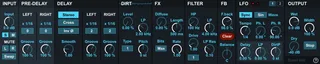
ehDirtDelay has a number of unusual if not novel features:
Outside the feedback loop:
- A pre-delay for expanded rhythmic potential.
- Two syncable LFOs with per stereo channel phase settings.
In the feedback loop:
- Unipolar amplitude modulation, for adding dirt, noise and glitch.
- A basic reverb for diffusing the signal or "metalizing" it.
- Three choices for overdrive / distortion.
- Samplerate / bitdepth reduction.
Convenient signal routing options:
- Stereo or mono input.
- Mute left or right input.
- Swap left and right input.
- Feedback stereo balance.
- Invert feedback phase.
Click the question mark to view a diagram of the signal path.
Audio examples here: https://soundcloud.com/ernst-hot/sets/ehdirtdelay
CHANGELOG
Update v1.04:
- Bugfix: Tempo now correctly follows Ableton Live.
- Moved away from including version number in filename
Update v1.03:
- Feature: You can now link the left and right delay times.
- Bugfix: The polarity of the balance knob was inverted.
Update v1.02:
- Bugfix: The left and right output channels were swapped.
Update v1.01:
- Feature: Delay time selection updated to allow for more flexibility.
Comments (5)
I am a delay junkie and approve this message ;]
seriously awesome work. Thanks so much for this, ErnstHot!
Muting 1 channel along with the Stereo/Crossover onto a single macro offers that conversion to ping-pong delay, as you suggested in the instructions. Easy Peasy
Like the STOP function. I wonder if a separate device with a simple passthrough along with clip recording function could be made to record via Resampling on a per track basis while retaining effect tails. Maybe it could function with the Clip slot stop button rather than the transport, such that resampling with tails could be accomplished without stopping the transport? Hmmmm