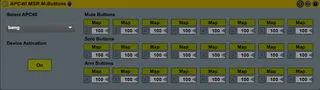
APC40 MSR Momentary Buttons
This device turns the Activator, Solo and Record Arm Buttons...
- Type
- Audio Effect
- Author
- NoIsYs
- Version
- 1.0
- License
- None
- Live version
- 9.7
- Max version
- 7.2.4
- Downloads
- 882
- Updated
- 2018-05-31
APC40 MSR Momentary Buttons is an Audio Effect for Ableton Live by NoIsYs, distributed as freeware, with no license specified by the author. It targets Live 9.7 and Max 7.2.4. On maxforlive.com it has 882 downloads. First published 2016-11-11, last updated 2018-05-31. 5 user comments below.
New to Max for Live? Read what Audio Effects do, how device licenses work, how to install a device.
Description
This device turns the Activator, Solo and Record Arm Buttons from the APC40 into free assignable momentary Buttons. Put it on any Track in your Liveset and map the requested Parameter.
For fast access i mapped the ON/OFF button via Midimapping to the APC40 shift button
Known issues:
Device selection shows only "bang"
If device is deleted, lights are remaining in Momentary Mode. (turn on and turn off midi mapping)
If device is "on" and midi mapping is turned on and off, it loses connection (turn device off and again on)
If somebody has ideas for improvements: You are welcome.
Very nice would be if the momentary mode works over midi mapping... But i have no useful idea how to get that.
Enjoy!
Comments (5)
Might you help me?
Here is the photo
Thank you very much
https://pictub.club/image/swoW06
https://pictub.club/image/swoxYP
Thank you for creating and sharing such a device!
...But I also cannot see the mapping buttons. I am running Live 9.7.1 64 bit, with an APC 40 mk I. The mapping buttons of the device do not appear as they do in your screenshot.
https://drive.google.com/file/d/17mLZ8Q5yJt6msHhmKlGnNtm4rdeOyqvP/view?usp=sharing