- Type
- Audio Effect
- Author
- stuartm
- Version
- 1.0
- License
- AttributionNonCommercialShareAlike
- Live version
- 9.7
- Max version
- 7.3
- Downloads
- 677
- Updated
- 2016-11-06
Clip Shifter is an Audio Effect for Ableton Live by stuartm, distributed as Creative Commons Attribution-NonCommercial-ShareAlike. It targets Live 9.7 and Max 7.3. On maxforlive.com it has 677 downloads. Published 2016-11-06. 1 user comment below.
New to Max for Live? Read what Audio Effects do, what the AttributionNonCommercialShareAlike license means, how to install a device.
Description
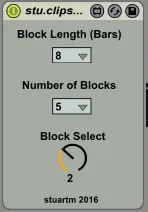
Rather simple device for selecting different parts of a clip to play, by parallel adjusting of start/end markers as well as loop start/end points.
The aim was to combine several clips into a single one and "scroll" though them with a single MIDI controlled knob.
If you know Octatrack SampleChains, you get the idea.
- Works on both MIDI and Audio Clips.
- Always affects the clip of the current scene within the track the device is located on
- A selectable part of the clips is referred to as a "block"
- All three parameters can be automated.
"Block Length (Bars)"
This dropdown selects how long the selectable blocks are. Can by 1, 2, 4, 8 or 16 bars
"Number of Blocks"
This dropdown selects how many blocks shall be selectable (1 to 8).
The overall clip length has to be [BlockLength] times [Number of Blocks]
"Block Select"
This dial adjust to the number of blocks and can be used to "scroll" though the blocks.
Comments (1)
Really good device !
One question it's works well on a drum rack or vst but I can't lood device on a midi track that sequence a external instrument (electribe).Anny ideas?
More explanations:
- I have a midi track routed to an exteranal channel
-When I drag drop you device the extarnal midi routing is replaced by a standard audio rooting..