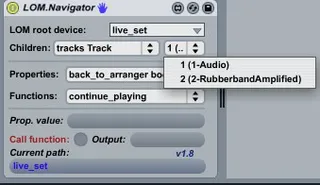
LOM.Navigator
The LOM.Navigator will allow you to get all available proper...
- Type
- Audio Effect
- Author
- ShelLuser
- Version
- 1.8
- License
- Attribution
- Live version
- 8.2.1
- Max version
- 5.1.9
- Downloads
- 2,537
- Updated
- 2012-08-10
LOM.Navigator is an Audio Effect for Ableton Live by ShelLuser, distributed as Creative Commons Attribution. It targets Live 8.2.1 and Max 5.1.9. On maxforlive.com it has 2,537 downloads. First published 2010-10-24, last updated 2012-08-10. 16 user comments below.
New to Max for Live? Read what Audio Effects do, what the Attribution license means, how to install a device.
Description
The LOM.Navigator will allow you to get all available properties and change their values as well calling any function from the Live Object Model (which is all part of the 'Live API'). Function parameters can be specified.
This patch also gives you full access to the control
surfaces scripts, but pay close attention to the
instructions on how to use it.
Keep in mind: This patch is licensed under the Apache v2.0 license. See inside the patch (or the URL mentioned) for more details.
Comments (16)
I'm very intrigued by it, clueless at the same time. I'm mean I have some speculations, but I would really like to understand the control surface part better. Or anything for that matter. I feel like I just need to "see" what YOU do with it and why.
@mingus: Yes, its possible to edit control surfaces as well. The full archive (see url) also comes with a readme file which explains the basics and functionality. But in short it allows for control over properties and functions in any class it can reach (so including components which come with the control surfaces (components & controls).
@JuanSOLO: Hmm, I'm not so much of a video guy myself (don't have the software for that either) but I guess I could devote a blog post on this critter. Do keep in mind that my main usage here is study; both expanding my M4L expertise as well as the stuff you can do with it.
The part which I like best is when this navigator can actually display inconsistencies in the LOM as setup by Ableton & C'74.
See:
http://blog.synthfan.info/2011/04/11/m4l-diving-into-the-live-object-model.aspx
Im struggling a bit here, Im trying to access a chain in a drumrack to access the parameters on the device inside that chain and even though i have studied your writings here unless im doing something completely wring it is not working,,, I even stuck you LOW navigator after the rack but even going through the steps it doesent seem to be picking up the chain even though one is there? Any Ideas?
thanks XG
http://synthfan.info/lom-navigator-tutorial/