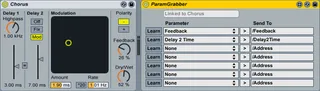
LiveGrabber - ParamGrabber
NOTE: Please download the latest version of this plugin from...
- Type
- Audio Effect
- Author
- mattijs
- Version
- 2.7
- License
- None
- Live version
- 8.2.6
- Max version
- 5.1.9
- Downloads
- 1,200
- Updated
- 2018-05-14
LiveGrabber - ParamGrabber is an Audio Effect for Ableton Live by mattijs, distributed as freeware, with no license specified by the author. It targets Live 8.2.6 and Max 5.1.9. On maxforlive.com it has 1,200 downloads. First published 2010-11-01, last updated 2018-05-14. 6 user comments below.
New to Max for Live? Read what Audio Effects do, how device licenses work, how to install a device.
Description
NOTE: Please download the latest version of this plugin from the website.
The LiveGrabber plugins are a set of Max For Live plugins that send device parameters, track parameters and audio analysis information from Ableton Live to any device on the network that supports Open Sound Control (OSC).
Comments (6)
any help appreciated
The LiveGrabber plugins are now updated with new looks and a Learn button for the ParamGrabber.
Cheers,
Mattijs
LiveGrabber 2.4 looks like a great update, but I'm having some trouble making it work. The grabbers do not update/recognize tracks/ effects and do not detect the presence of Grabbersender. The ParamGrabber states (greyed out) that it's "Linked to Chorus", just like in your screenshots of the device. The same goes for TrackGrabber that stays "Linked to track 1-Audio". Version 2.1 works just fine (Live 8.2.1, Max 5.1.7). Am I missing something?
help is appreciated :)
Sorry for not responding earlier (maxforlive.com doesn't seem to notify me of comments).
Please let me know if this issue persists in version 2.6 of the plugins with the latest version of Live and MFL.
Best,
Mattijs