outist - insist
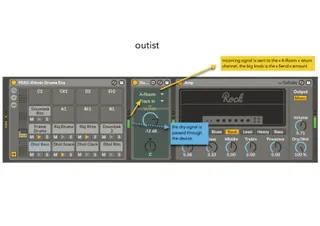
outist is a free device that lets you route any signal to an...
- Type
- Audio Effect
- Author
- Crampe
- Version
- 1.5
- License
- None
- Live version
- 10.0.1
- Max version
- 8
- Downloads
- 2
- Updated
- 2021-05-23
outist - insist is an Audio Effect for Ableton Live by Crampe, distributed as freeware, with no license specified by the author. It targets Live 10.0.1 and Max 8. On maxforlive.com it has 2 downloads. First published 2018-03-27, last updated 2021-05-23. 52 user comments below.
New to Max for Live? Read what Audio Effects do, how device licenses work, how to install a device.
Description
outist is a free device that lets you route any signal to any internal or external destination.
It’s designed to bypass Live’s restricted return buss routing. With outist you can have pre and post send PER return channel.
You can also simply use it to send the signal to any physical output or just anywhere in your set…
Insist (you guessed...) is now part of the download.
L10 and Max8 required
RELEASE NOTES:
v1.5:
- fixed the delay setting timing. There was 1 sample of delay when the delay was set to 0ms
v1.4:
- added Insist
- added an option to delay the Send signal.
- the dry signal (i.e the source) can now be muted.
- minor UI tweaks
v1.3:
- fix track chooser issue, finally!
- added Push mapping
v1.2:
-fix unwanted events being sent to Live's undo history
v1.1:
-fixed output volume; previously the output wasn't totally muted when at -inf
- fixed invisible big knob
Comments (52)
Sorry, it looks like there's an issue with the last update.
I'm just coming back home; fixing this asap.
Sorry for the hassle.
This device needs Live 10.
v1 works fine as usual.
I was hoping to use this as a way to route 3 different audio channels into a single effect but be able to choose which audio source will come through to the effect.
Thanks for your efforts and let me know if it's something super easy to change.
Do you mean a dry/wet ?
I was wandering if it would be possible to create some routing where you can feed the output of an Effect Rack back into the same Effect. Really an Input device that you can target by the outitst. Thx.
[email protected]
Great job, BiP is amazing too !
Raphael
When I set track A to route to Track B, and record/print the incoming signal onto track B, there appears to be a delay when I zoom in and compare the peaks between Track A and B. Does this device have inherent latency in the playback or am I doing something wrong?
Thanks!
Thanks again.
Honestly I can't tell you anything specifics about the latency, as it's something totally dependant on Live's API, and M4L isn't absolutely perfect with timing. That's just the way it is implemented and I can't do anything about this.
About quality, it's just the same as routing from a track to another one, it's just a bus. It uses the Live API and not some Max objects to send the signal.
So even though I haven't done a phase canceling test, I'm 100% sure there's absolutely no difference between your orignal source and the resulting routed signal.
So no quality loss whatsoever.
I just did a test and I don't get any latency here.
You probably have a plugin that introduce latency on your source track.
And I also did a phase cancelling test, just for the fun, and obviously it cancels out perfectly. So 100% exact same quality.
I never got any complains about these devices crashing.
In which situation does it happen?
Seems to be a bug where insist changes it's thru mode to off from time to time. Just reporting :)
Thanks for the report. Did you notice any pattern that would trigger this bug?
Is there any way to change the curve of Outist's send parameter so that it matches Live's send parameter? When copying automation from Live's send to Outist's send the values do not match up.
that's an interesting point! I'll look into this ;-)
but running into an issue where I get stuck in an infinite undo/redo step loop once I load up Outist in Live. once it's in a rack, Ctrl + Z will simply cycle between two audio outputs and go no further back in the project's undo history.
I fucking love this m4l device and it's instrumental to my workflow and I think it's awesome.
You should know that I'm having what I think is the same / similar problem as jabernathie. Any time I add or delete a track in a set that has Outist in it, it floods the Undo history with a loop of "Undo Change" "Undo Change in 'Outist'" messages that go back and forth forever. Despite this, I love Outist so much I just use it anyway, and it's never fucked me over until now.
I love this device so much; Pleeeeease fix this. Outist & Insist were free but I would straight up pay you $20 anyway if you fixed this one thing.
thanks for poiting this issue out. I never noticed this myself before, I'm wondering at which point it started happening? I have to look at it, but due to the nature of the device I feel like it's something in M4L that's causing this, maybe a a bug that appeared at some point during a Max update.
Sorry for the hassle, I'm on it asap!
I'll check this, thanks!
does this plugin cause any latency? I am using most of my processing plugins on a send / return basis instead of using them as inserts. Ableton limits the amount of send / return busses and I would love to use just audiotracks instead but obviously timing is crucial.
;-)
Thanks!
the time needed for your sound to be converted from digital to analog depends on your computer + sound card. Outist's processing doesn't add latency afaik, but you can't fight against the laws of nature that applies to get the waves out of your speakers. I'm surprised that you're seeing more delay compare to the External Audio Effect, but unfortunately I can't help here.
While it's possible to use Outist to send signals to physical output it was mainly designed to route stuff internally, so if you like External Audio Effect works best in some situations, just go for it ;-)
Thanks for the great device
However, It seems the UNDO History bug is back.
Any chance it will be fixed soon?
I'll check this.
Is it happening all the time or only in certain situations?
I've got an issue with this plugin where it seems to break Abletons undo history. I accidentally deleted a couple of channels in a project and when attempting to undo, Ableton made changes to the instance of Inist in my project instead. Otherwise this is a great device!
Tom
Yeah, if I remember well it has to do with the source/destination selector... which is a built-in M4L "object". You should experience the same issue with e.g Ableton's Surround Panner device.
My name is Max DetaL’ and I’m absolutely stoked about your sender! But I’ve run into a little snag and have a couple of questions for you. Really hoping you can help me out.
1 – Is there any way to set it up so I can tell the sender to route its signal, say, to the first send channel named “A Drum Looper,” and then save that configuration so that every time I open a new sender, it automatically sends the signal to the channel I set before saving? In other words, can I lock it permanently to that send/return channel “A Drum Looper” (which I have in literally every project and always as the first one)? Right now, the device doesn’t save the routing on a new launch, which is super disappointing since it means I can’t use it.
2 – Maybe it’s possible to create a sender that specifies a virtual bus. For example, in the sender we could assign something like A1, and if the receiver is also set to A1, then they’d always be locked to work together. All A1 senders in the project would automatically send everything to the receiver where A1 is selected. Is this even possible? It’s important that I can save a preset and have it load immediately with the bus I configured in advance.
Really hoping something can be done. Your device is super cool. Thanks!
My name is Max DetaL’ and I’m absolutely stoked about your sender! But I’ve run into a little snag and have a couple of questions for you. Really hoping you can help me out.
1 – Is there any way to set it up so I can tell the sender to route its signal, say, to the first send channel named “A Drum Looper,” and then save that configuration so that every time I open a new sender, it automatically sends the signal to the channel I set before saving? In other words, can I lock it permanently to that send/return channel “A Drum Looper” (which I have in literally every project and always as the first one)? Right now, the device doesn’t save the routing on a new launch, which is super disappointing since it means I can’t use it.
2 – Maybe it’s possible to create a sender that specifies a virtual bus. For example, in the sender we could assign something like A1, and if the receiver is also set to A1, then they’d always be locked to work together. All A1 senders in the project would automatically send everything to the receiver where A1 is selected. Is this even possible? It’s important that I can save a preset and have it load immediately with the bus I configured in advance.
Really hoping something can be done. Your device is super cool. Thanks!