- Type
- Audio Effect
- Author
- Funkatronics
- Version
- 1.0.1
- License
- None
- Live version
- 10.0.3
- Max version
- 7.3.5
- Downloads
- 12,463
- Updated
- 2018-09-13
VU Meter is an Audio Effect for Ableton Live by Funkatronics, distributed as freeware, with no license specified by the author. It targets Live 10.0.3 and Max 7.3.5. On maxforlive.com it has 12,463 downloads. First published 2018-04-04, last updated 2018-09-13. 16 user comments below.
New to Max for Live? Read what Audio Effects do, how device licenses work, how to install a device.
Description
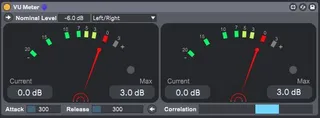
An Ableton-esque VU meter that tries to model the behavior of older analog VU meters while adding some more modern features.
It is essentially an RMS meter with a long attack/release time that is useful for gain staging and quick leveling of tracks. Features a channel split mode for viewing the left/right or mid/side channels simultaneously, nominal (reference) level adjustment, adjustable attack/release, a floating window, and a proper L/R phase correlation meter.
Note: this is not a loudness meter and therefore not the proper tool for measuring the loudness of your mixes. For loudness measurements, check out my Loudness Meter device here: http://www.maxforlive.com/library/device/5005/loudness-meter
Changelog
1.0.1 - 2018-09-12
Fixed
- Issue where the device would hijack/corrupt Live's undo history
1.0.0 - 2018-04-03
Added
- Initial Release
The above format is based on Keep a Changelog (http://keepachangelog.com/en/1.0.0/) and this project adheres to Semantic Versioning (http://semver.org/spec/v2.0.0.html).
Comments (16)
Thanks a lot for sharing your work. :D
Can u take a look sometime? Its a brilliant and super useful max device, but ruined by this one bug.
thanks in advance!
Sorry again for the delay on this bug fix!
Funkatronics
Noticed a possible bug though. When extending the plugin to split the left and right channels it seems like the right channel is giving an incorrect reading when viewing from the rack. However, it gives the correct reading when you open the plugin itself... Here's an example. Using version vu-meter 1.0.1 with Live 10.1 on MacOS 10.14.5.
https://imgur.com/a/OFyT1l5
Could you send me a simple Live set that reproduces the issue using stock Ableton plugins (just to make sure I have the right instruments to run the set)? You can send it to my email at [email protected].
Sorry I can't be of more help at the moment, I would like to get this issue fixed for ya. Thank you for the feedback and for using my device! I really appreciate it!
Just tried to make a Live Set for you but I was unable to reproduce the error. Everything seems to be running perfectly now. Must have been something to do with my version of Live as that's the only thing I have changed (I'm now running 10.1.14). Unfortunately, I did not give the subversion number last time so unsure which version might have been causing the issue so sorry about that.
Thanks again!
I would even pay for this small device to have support today, thank you guys :)
I tried a couple things, but haven't been able to make it give the same values.