- Type
- Instrument
- Author
- pmedig
- Version
- 1.0
- License
- None
- Live version
- 10.0.1
- Max version
- 7.3.5
- Downloads
- 588
- Updated
- No Updates
Buffer TempoScan is an Instrument for Ableton Live by pmedig, distributed as freeware, with no license specified by the author. It targets Live 10.0.1 and Max 7.3.5. On maxforlive.com it has 588 downloads. Published 2018-05-14.
New to Max for Live? Read what Instruments do, how device licenses work, how to install a device.
Description
Buffer TempoScan V1 by pmedig (www.pmedig.com)
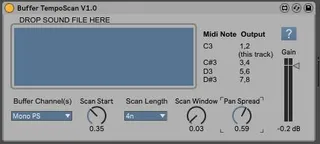
This M4L instrument scans an audio file (from a buffer) for the length of a specified note value (Scan Size) at a specific position (Scan Start) repeatedly according to the project tempo. The audio output can be directed to 4 different stereo outputs according to the midi note selected.
Midi Note C3 sends the audio to outputs 1/2 (track where the Buffer TempoScan is located). Midi Note C#3 to outputs 3/4, Midi Note D3 to outputs 5/6, Midi Note D#3 to outputs 7/8. To use the different stereo outputs: make a new audio track and choose the track of the Buffer TempoScan as input type and as input channel 3/4, 5/6, or 7/8 from the Buffer TempoScan.
Buffer Channel(s)
Stereo: uses L and R channels of a stereo file
Left (mono): uses L channel of a stereo file or the single channel of a mono file
Right: uses R channel of a stereo file
Mono PS: Pan spreading of a monoed stereo file
Left (mono) PS: Pan spreading using the L channel of a stereo file or the single channel of a mono file
Right PS: Pan spreading using the R channel of a stereo file
Scan Start
Scan start position as fraction of the file size (0 - 1).
Scan Length
Length 4n = 1/4 note etc. (d=dotted t=triplet). Length in milliseconds depends on the project tempo.
Scan Window
0 = rectangle, 0.5= triangle. A value of 0.03-0.04 is recommended to avoid clicks.
Pan Spread
Positions each scan in the stereo field. 0 = mono, 1 = 100% stereo. Only active when Mono PS, Left PS or Right PS is chosen in the Buffer Channel(s) menu. Each scan is located randomly to a position in a range defined by the spread.