- Type
- Instrument
- Author
- opticon93
- Version
- 1.4
- License
- None
- Live version
- 10.0.1
- Max version
- 7.3.5
- Downloads
- 803
- Updated
- 2018-10-29
Many-Rample is an Instrument for Ableton Live by opticon93, distributed as freeware, with no license specified by the author. It targets Live 10.0.1 and Max 7.3.5. On maxforlive.com it has 803 downloads. First published 2018-05-11, last updated 2018-10-29. 3 user comments below.
New to Max for Live? Read what Instruments do, how device licenses work, how to install a device.
Description
Hi,
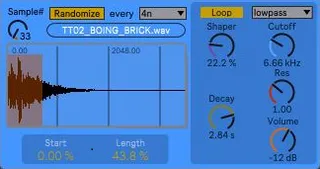
This device allows you to drop an entire folder into Ram. Each sample gets its own Ram Buffer which allows you to quickly switch between them, without relying on hard drive speed. Naturally, it takes more Ram.
So far, I haven't discovered a way to load a Folder from the Live Browser. You can audition files/folders from the Live Browser, but you need to right click and "Show in Explorer" and then load the folder from the Explorer.
Because everything is in Ram, I added an Auto Randomizer.
Enjoy.
Comments (3)
i am update your patch Many-Sample 1.2 to V2 mikado
http://www.maxforlive.com/library/device.php?id=5227
Store and Recall all parameter ,, samples select
so if you put many of this patch in drum rack
to another track without loose sample selection
-- add Button to Open Folder
(( drag&drop , won't work with Ableton Live as Administrator ,""if use jbridge"" ))
-- add push INC DEC samples
store and recall all function so put many of this patch in drum rack
http://www.maxforlive.com/library/device.php?id=5227