Loudness Meter
Loudness Meter is a tool for measuring the perceived loudnes...
- Type
- Audio Effect
- Author
- Funkatronics
- Version
- 1.0.0
- License
- AttributionNonCommercialShareAlike
- Live version
- 10.0.3
- Max version
- 7.3.5
- Downloads
- 10,285
- Updated
- 2018-09-13
Loudness Meter is an Audio Effect for Ableton Live by Funkatronics, distributed as Creative Commons Attribution-NonCommercial-ShareAlike. It targets Live 10.0.3 and Max 7.3.5. On maxforlive.com it has 10,285 downloads. First published 2018-09-12, last updated 2018-09-13. 20 user comments below.
New to Max for Live? Read what Audio Effects do, what the AttributionNonCommercialShareAlike license means, how to install a device.
Description
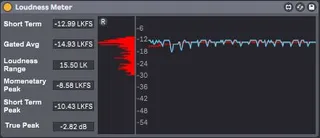
Loudness Meter is a tool for measuring the perceived loudness of your audio according to the ITU-R BS.1770 program loudness and true-peak audio level algorithm. It includes both short-term and integrated loudness measurements, as well as loudness range and true peak. The algorithm has been implemented without the use of ANY externals, and has been tested with the EBU loudness test set for compliance with EBU Tech-3341. Any sampling rate is supported, although very high sampling rates (>96000) introduce a small amount of error in the measurement.
Both momentary and short-term loudness are plotted over the past 10 seconds on the devices display (momentary in blue and short term in red). A histogram of the measured loudness (since the last reset) is displayed vertically alongside this plot in red.
No more guessing if your track is too loud or quiet, or if it will clip or be normalized when streamed online! Simply add Loudness Meter to your mastering chain and play through your material of interest to obtain a measurement. Stopping Live's transport will pause the measurement system, and everything can be reset at any time using the small "R" button on the top-left corner of the histogram.
If you encounter any bugs/issues, or have any questions just drop a comment down below!
Changelog
1.0.0 - 2018-09-12
Added
Initial Release
The above format is based on Keep a Changelog (http://keepachangelog.com/en/1.0.0/) and this project adheres to Semantic Versioning (http://semver.org/spec/v2.0.0.html).
Comments (20)
What about making it as a floating window?
A floating window is a great idea! Ill see if I can implement this in the near future.
Thank you!
- Funkatronics
It's easy to patch a floating window. I'll let you know if take a moment to do it before you do.
cheers n' blessings,
Garrett
A very minor request. When you put this device along other native Ableton devices, the only minor visual conflict is that the headers in ableton native devices are not in bold text but the Loudness meter header texts (like "short term" and "gated average" etc are in Bold. Is it possible to make them plain text to fit in better. I realize it is a petty request but appreciate if you can consider it.
Thank you very much for bringing in a great useful device here!!
@Crampe I should be able to get that floating window added for ya, but it may be a bit of a CPU hog. Sometimes the floating windows can have a bad impact on Live's framerate for some reason, even when using the gpu to render the window content.
@GarrettNorvell this a great idea, I'll see what I can do!
@atanaka I appreciate you bringing this up. I prefer to make my plugins look as native to Ableton as possible, so this is really great feedback for me. Ill get this fixed up in the next version.
Thank you all so much for all of the feedback and kind words here, I'll try to get a new version out ASAP!
- Funkatronics
everything else is great! thank you so much!