- Type
- Audio Effect
- Author
- sy9
- Version
- 1.0
- License
- None
- Live version
- 10.0.1
- Max version
- 7.3.5
- Downloads
- 280
- Updated
- No Updates
Jukebox is an Audio Effect for Ableton Live by sy9, distributed as freeware, with no license specified by the author. It targets Live 10.0.1 and Max 7.3.5. On maxforlive.com it has 280 downloads. Published 2018-08-26. 1 user comment below.
New to Max for Live? Read what Audio Effects do, how device licenses work, how to install a device.
Description
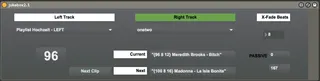
Autoplay Clips in Live. Choose two tracks (left + right), hit play on the first clip and this M4L app will automagically launch the next clip. Features:
* Prepend clip names with tempo, intro + outro # of beats
* Smoothly adjusts tempo from one clip to the other
Example clip names:
{100} Artist - Nice Song
{120 16 32} Another one - 16 beats intro and 32 beats outro
Todo:
* add track volume control to fade in new songs
Note that this is the very first device I ever built in Max and it's kind of beta! Suggestions and improvements welcome!
Cheers,
Steffen
Comments (1)
I have some ideas as to how to implement your volume automation as well as a few other ideas to further increase the functionality of the device.
You can find me via my user name at g mail
If I end up building any of these other ideas on, I'll be glad to send it to you.
Cool device!