Halved Arpeggios
Max For Live MIDI 8-step sequencer aimed to light up inspira...
- Type
- MIDI Effect
- Author
- stefanostev
- Version
- 1.2
- License
- AttributionNonCommercialShareAlike
- Live version
- 10.0.1
- Max version
- 8.1
- Downloads
- 1,547
- Updated
- 2021-04-14
Halved Arpeggios is a MIDI Effect for Ableton Live by stefanostev, distributed as Creative Commons Attribution-NonCommercial-ShareAlike. It targets Live 10.0.1 and Max 8.1. On maxforlive.com it has 1,547 downloads. First published 2019-06-17, last updated 2021-04-14. 8 user comments below.
New to Max for Live? Read what MIDI Effects do, what the AttributionNonCommercialShareAlike license means, how to install a device.
Description
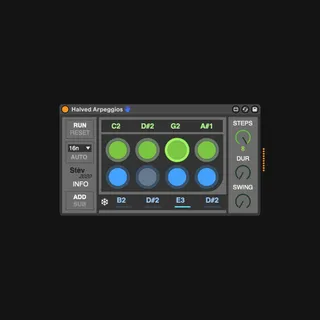
Max For Live MIDI 8-step sequencer aimed to light up inspiration.
Half of the notes are input by the user, the patch generates the remaining ones.
The user can input up to four simultaneous notes, that are spread over the first four steps of the sequence. In order to do so, the notes must be pressed and hold at the same time, like the usual procedure for arpeggiators. Any note added beyond the fourth one will be spread starting over from step 1 to 4 (i.e. notes 5-6 are going to replace notes 1-2). In the current version, generated notes are based on relative one-octave major scale of the correspondent upward input note (note value in step 1 will be the root note of the major scale from which the patch will create the note for step 5, note value in step 2 for step 6, and so on...). The toggles on the sequencer turn on/off the correspondent step.
The FREEZE (❄) section controls generated notes. User can de-activate constant refresh of notes generation by turning on the button relative to single steps (hence 'freezing' the current note): by doing so, the note will refresh only when a new one will be input in the other half correspondent step. Switching from ADD to SUB will generate notes in a mirrored major progression toward the lower octave.
RUN runs the sequence, RESET resets it to the first step.
The sequencer has a tempo division menu. By activating AUTO, divisions will change randomly.
SWING controls the sequencer swing, STEPS sets the overall number of steps, DUR controls the duration of notes gate.
Comments (8)
Still some minor bugs to be fixed though, hope I'll be able to update this version soon!
this is fun
I'm trying to use this but it doesn't product a sound. Is there a manual or instructional video that I can check? Because may have missed something. THankyou
I'm trying to use this but it doesn't product a sound. Is there a manual or instructional video that I can check? Because may have missed something. THankyou