- Type
- MIDI Effect
- Author
- killihu
- Version
- 1.2
- License
- None
- Live version
- 11.3.21
- Max version
- 8.5.6
- Downloads
- 2,031
- Updated
- 2024-12-27
MIDI Wheels is a MIDI Effect for Ableton Live by killihu, distributed as freeware, with no license specified by the author. It targets Live 11.3.21 and Max 8.5.6. On maxforlive.com it has 2,031 downloads. First published 2020-06-16, last updated 2024-12-27. 19 user comments below.
New to Max for Live? Read what MIDI Effects do, how device licenses work, how to install a device.
Description
This plugin has some functions that can be useful both if you have or do not have a MIDI keyboard. Modwheel and Pitchbend receive MIDI data from external controllers.
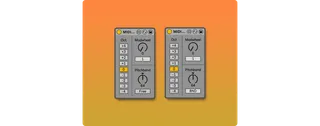
These are the plugin controls:
- Octave Change.
- Modulation wheel with MIDI control selector.
- Pitch wheel simulation (type A).
- Pitch wheel with MIDI control selector (type B).
See details and changelog at:
https://killihu.vstskins.com/midi-wheels/
Comments (19)
Do you know by any chance if the knobs for the wheels could be automated on the playlist? Somehow when I click on them I don't get an option to, don't really know if it's possible I know nothing about M4L
Thanks for ur hard work btw
I'd be happy to chip in $3, this device perfectly solved my problem.
I use this basically as a fine-tune add-on for the Simpler device.
TLDR: this is my favorite way to fix a sample that is slightly out of tune (ie, flat or sharp by +/- 50 cents). Because Simpler does not have fine tuning, and you don't want to use Sampler.
Problem:
- You're layering two one-shots: sampleC4 and sampleD4. You try using Simpler and a device chain to layer the sounds. You tune sampleD4 down 2 semitones in simpler (using the Transpose knob on one-shot Simpler mode), to correct the difference in root note. Hopefully, now two the samples are in tune with each other.
- THE ISSUE: sampleD4 is still out of tune, a few cents sharp actually. So when you layer the sounds, and play them in unison, they are slightly out of tune from each other (gross).
- You don't want to switch to a Sampler device just to do some basic fine tuning. You could manually time-stretch your audio file, but who has time for that (I'm lazy).
Solution:
- Virtually "freeze" and offsetting incoming pitch bend wheel value for all incoming midi notes. And of course, be able to do this in a device chain, ie, not globally, so that you can tune different instances of Simpler.
- So now, you add this device right before the Simpler device containing sampleD4. And adjust the "pitchbend" parameter of Midi Wheels 1.1, downward slightly (with the "Free" box activated). NOW, every time you press a midi note, Midi Wheels 1.1 will virtually 'lock in' the pitch bend wheel value, JUST FOR THAT DEVICE CHAIN.
- Now, you can layer a bunch of shitty samples you downloaded online, that nobody took the time to finetune, and quickly finetune them within your Live Set so that they all sound nice when in unison, all while using Simpler.
TLDR: this is my favorite way to fix a sample that is slightly out of tune (ie, flat or sharp by +/- 50 cents). Because Simpler does not have fine tuning, and you don't want to use Sampler.
Can you please fix it ?