Sequencer-Ki
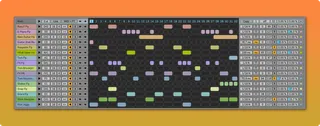
Sequencer-Ki is a 16-track sequencer for Ableton Live. ...
- Type
- MIDI Effect
- Author
- killihu
- Version
- 1.2.2
- License
- Commercial
- Live version
- 11.3.20
- Max version
- 8.5.6
- Downloads
- 0
- Updated
- 2024-12-27
Sequencer-Ki is a MIDI Effect for Ableton Live by killihu, distributed as a commercial (paid) device. It targets Live 11.3.20 and Max 8.5.6. First published 2020-06-16, last updated 2024-12-27. 14 user comments below.
New to Max for Live? Read what MIDI Effects do, what the Commercial license means, how to install a device.
Description
Sequencer-Ki is a 16-track sequencer for Ableton Live.
Main features:
- 16 tracks with independent trigger probability, length and speed, velocity and random velocity, note length beat synced and time-based, random note length, swing and random swing.
- Different playback modes per track: Forward / Backward / Ping-Pong / Ping-Pong Reversed / 4 Random modes.
- Selectable MIDI output notes and master transpose.
- 16 velocity lanes, one for each track.
- 32 envelope lanes that can be mapped to Live controls, output MIDI control changes or control the note length and the probability per step of the tracks.
- Variable smoothing of the values sent by the envelopes.
- Selectable trigger probability for steps and envelope lanes.
- Randomization of notes and envelope lanes.
- Copy / Paste data between tracks (notes and envelopes). Envelopes can be copied and pasted into any other envelope.
- 32 patterns that can be changed by MIDI input notes or automatic randomization.
- Custom track names and colors.
- Auto-rename tracks based on Live Drum Rack names.
- Link button to change parameters on all tracks at once.
- Available zoom levels: 100% / 110% / 120% / 130% / 140% / 150% / 160% / 170% / 180% / 190% / 200%.
- The interface colors automatically change to match the color theme of Live.
See details and changelog at:
https://killihu.vstskins.com/sequencer-ki/
Comments (14)
A global retrig and a retrig for each sequence function, so the polyrythmic madness can be more controlable.
An autoname function for the sequences name based on the drumrack selected or the closest in the chain.
Some smoothing feature for the envelope lines.
A note offseter to be able to offset a 32 sequences readed at speed 1 to be displaced by a percentage of the 1 length, or a specific number of 1/4, 1/8, 1/16 or a fixed time in secs.
I'm also wondering if we could have some kind of random sequence displacement, by clicking randomly (or according to a pattern) onto the arrows. Or maybe my last two ideas can give you an idea about a more convenient tool that can do both.
Anyway, this device is already incredible, love your work, thanks !!! :)
Maybe it's not your purpose but having also probabilistic alternate note(s) hitted by the sequences would give this to be the best sequencer ever haha
It adds a lot of UI elements, but your interface is so clean that i'm sure you would be able to make some sense about this.
I love the GUI that these two guys build if you don't know them :
https://maxforlive.com/library/device/6332/brums
https://maxforlive.com/library/device/6259/lfo-morf
I am updating the plugin web page with suggestions that I receive from users and that I will try to implement in future versions.
I don't want to release many small updates, I prefer to release few updates with as many improvements as possible.
I take note of your suggestions and keep them in mind for the future.
It may happen that moving the sequencer inside the rack causes the sequencer values to change. If that happens press CTRL + Z (undo) and the sequencer values will return to the correct state, and the sequencer will still be inside the rack.
Only request how about a full featured note sequencer with very similar features that can compete with things like Five12 Numerology and Geist 2 Logic Pro X 10.5 sequencing for things like both random and also vary for every parameter with 1-32 steps on each note and any division.